SDI Online walkthrough
How to apply for California short-term disability in SDI Online
California short-term disability means the Disability Insurance half of SDI, and it is applied for online through myEDD and SDI Online. Here is the whole path — who qualifies, what to have ready, which screen does what, the three deadlines, and where to check whether the claim is actually moving.
The short answer
- You qualify for California Disability Insurance if you cannot do your regular work for at least eight days, lose wages because of the disability, are working or actively looking for work when it begins, and earned at least $300 in wages with SDI withheld in your base period — the CASDI deduction on your paystub.
- Benefits pay about 70–90% of the wages you earned five to 18 months before your claim start date, depending on income, up to the maximum weekly benefit amount, for a maximum of 52 weeks.
- Apply through SDI Online inside myEDD: create the myEDD account, register for SDI Online (with ID.me identity verification where EDD asks for it), then Apply for Benefits → Apply for Disability and submit Part A – Claimant’s Statement.
- Time it: file no earlier than nine days and no later than 49 days after your disability begins, and save the receipt number so your licensed health professional can submit the medical certification.
- The claim is not processed until EDD holds both your Part A and the certification; EDD usually reports the status within 14 days, and you watch it in SDI Online.
Source videos
How to Apply for Disability Benefits Using SDI Online
CaliforniaEDD — California Employment Development Department
All stills come from the official CaliforniaEDD channel, and they deliberately mix two kinds of image. The live screen captures of myEDD and SDI Online come from “How to Set Up Direct Deposit (Online) for Disability and Paid Family Leave Benefits”, “Applying online for Disability Insurance benefits is now easier and faster!” and “California Enhances myEDD to Help State Disability Insurance Customers”; each was cropped to the browser window so EDD’s own burned-in tutorial captions are not part of the picture. The step illustration of the 49-day rule is an official EDD illustration from “How to Apply for Disability Benefits Using SDI Online”, not a screen capture, and it is labelled as such in its caption. The written steps are our own and were checked against EDD’s filing and eligibility pages: edd.ca.gov/en/disability/how_to_file_a_di_claim_in_sdi_online/
How to apply for California SDI, step by step
Fourteen steps, from checking eligibility to reading your claim status. Every screenshot links to the exact second in its source video, and the source note above says which stills are live captures and which are EDD illustrations.
- 1
Check that you meet the DI eligibility rules first
California short-term disability is the State Disability Insurance (SDI) program, and the Disability Insurance (DI) half pays wage replacement when a non-work illness, injury, surgery, pregnancy or childbirth keeps you off work. You qualify if you cannot do your regular work for at least eight days, you lose wages because of the disability, you are working or actively looking for work when the disability begins, and you earned at least $300 in wages with SDI withheld during your base period — the deduction appears as CASDI on your paystub. You must also be under the care of a licensed health professional within the first eight days of the disability and stay under treatment. Citizenship and immigration status do not affect eligibility, and you can collect up to 52 weeks of benefits.
- 2
Get your information in order before you open the application
EDD asks for your full legal name as it appears on your identification, your date of birth, your Social Security number, your most current employer’s business name, phone number and mailing address, and the last date you worked your normal duties — or the date you moved to reduced or modified duty. Have a valid photo identification ready as well. Only if it applies to you, also gather the wages you received or expect to receive from your employer (sick leave, paid time off, vacation pay, annual leave, and wages earned after you stopped working), any workers’ compensation claim information, and, if you receive inpatient treatment at an alcohol recovery home or drug-free rehabilitation facility, that facility’s name, address and phone number. If you have no valid photo ID or Social Security number, had a recent name change, or have a name that will not fit the online form, EDD asks you to file the paper DE 2501 instead.
- 3
Create your myEDD account
SDI Online lives inside myEDD at myedd.edd.ca.gov, which is open 24 hours a day. Select Create Account and register with your own email address. Submitting that form does not finish the job: EDD emails a confirmation link that completes the setup, and the link expires within 48 hours, so open it the same day and check your spam or junk folder if it has not arrived. Only once the account is confirmed can you connect it to SDI Online.
- 4
Register for SDI Online and choose SDI Online from myEDD
Log in to myEDD and select SDI Online, then choose the customer type that fits you on the SDI Online Registration Options screen and follow the instructions. This is a one-time registration: after it, every claim you file and every message EDD sends you lives in the same SDI Online account, and you get back to it through the SDI Online button on the myEDD home page.
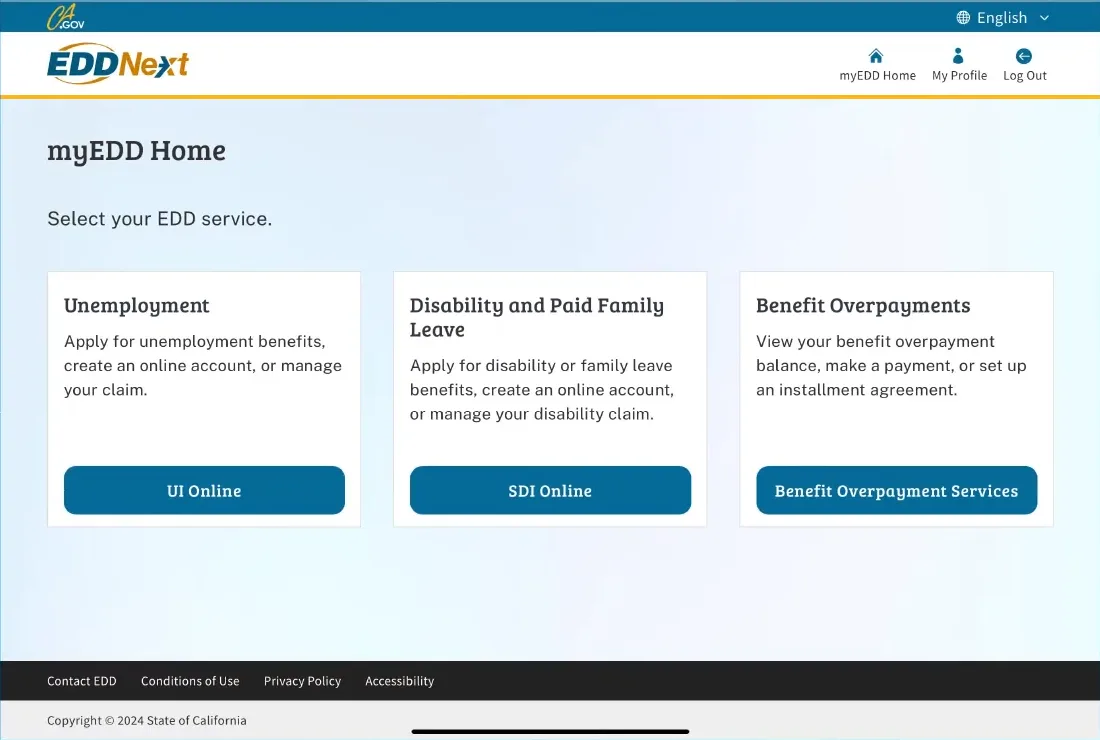
SDI Online sits behind the myEDD login — there is no separate SDI Online password.Watch at 0:45 - 5
Verify your identity and keep your EDD Customer Account Number
Before an SDI Online account can be finished, EDD may send you through ID.me to confirm your identity; once ID.me verifies you, you are returned to the EDD site to complete the registration. When it is done you are assigned an EDD Customer Account Number, which appears in the Personal Information block of your Profile page, and EDD confirms the registration by email and by mail. Keep the number secure but within reach: a customer service representative may ask you for it, and you use it whenever EDD has to identify your account without your claim in front of them.
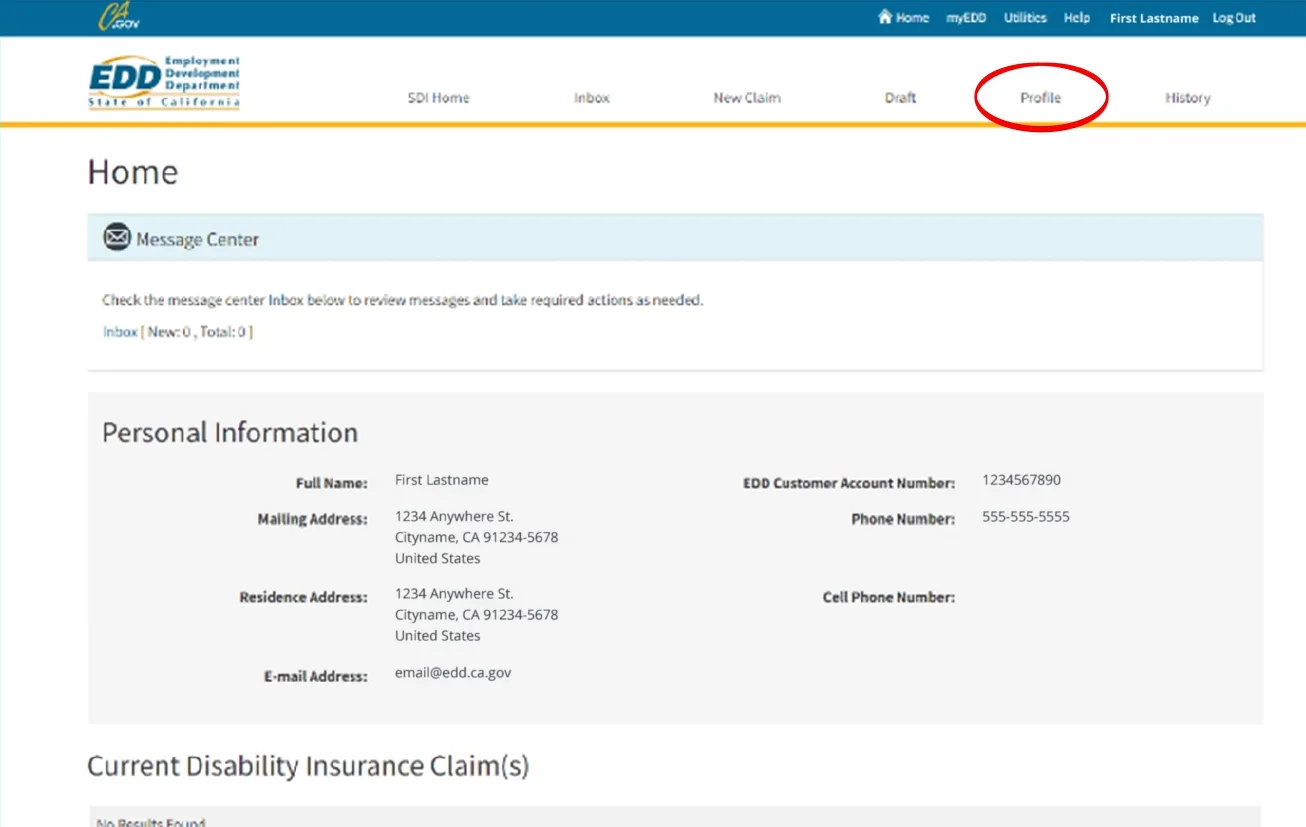
Your EDD Customer Account Number lives on the Profile page — copy it somewhere safe.Watch at 0:55 - 6
Start the claim: Apply for Benefits, then Apply for Disability
On the SDI Online home page select Apply for Benefits and choose Apply for Disability, then work through the sections in order — personal information, initial questions, employment information and additional information. Pay attention to the date your disability began: it is the first day you could not do your regular work, EDD treats it as your claim start date, and once a valid claim exists you cannot change the start date or adjust the base period. If you need to stop partway, the draft stays in the Draft tab. EDD will not process a claim that is not properly completed.
- 7
Read the instructions screen before you fill anything in
The application opens with an instructions page, and the official EDD video outlines the Medical Certification section in green so it is not skimmed past. It sets out the two timing rules — file no earlier than nine days and no later than 49 days after your disability begins — states that your employer is notified that you applied while your medical information stays confidential, and warns that EDD cannot process the claim until your licensed health professional completes the medical certification. It also names the detail you will need: the date your disability started, meaning the first day you were not able to do your regular work, plus employment information such as employer names, dates worked, addresses and phone numbers.
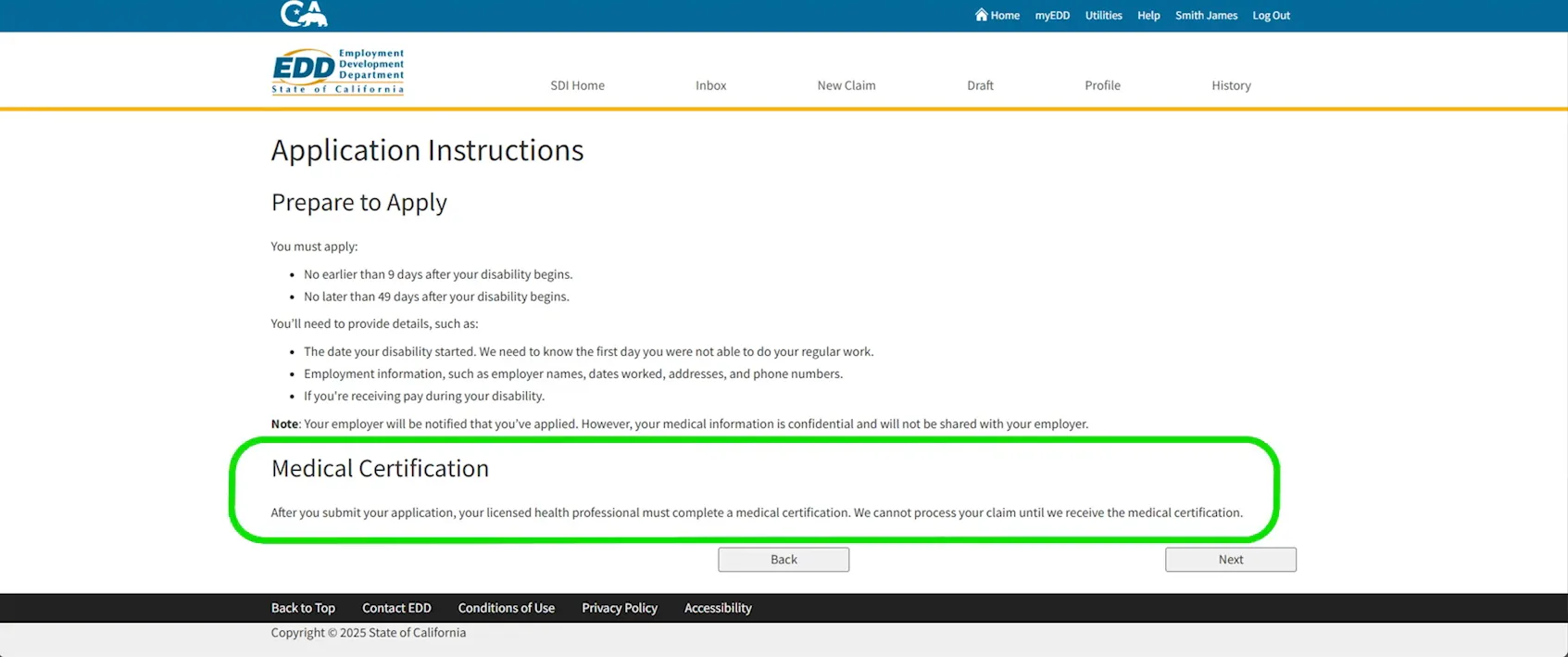
Read this screen before you type: it carries the filing window and the certification warning.Watch at 1:31 - 8
Complete Part A – Claimant’s Statement and sign the declaration
Part A is the claimant’s statement, and you are the one who fills it in. At the end you reach Step 5, Certification. Tick the Section 10 declaration confirming that you were unemployed and disabled for the period the claim covers and that the statement is true — EDD notes that a false statement or a concealed material fact is a violation of California law. Tick the Health Insurance Portability and Accountability Act (HIPAA) authorization as well, so your provider can release the medical, vocational rehabilitation and billing records tied to this claim. The Authorized Physician/Practitioner Name field is for the provider who will certify you, and the page ends with the reminder that you can print the application in a new window or save and file the claim with Submit.
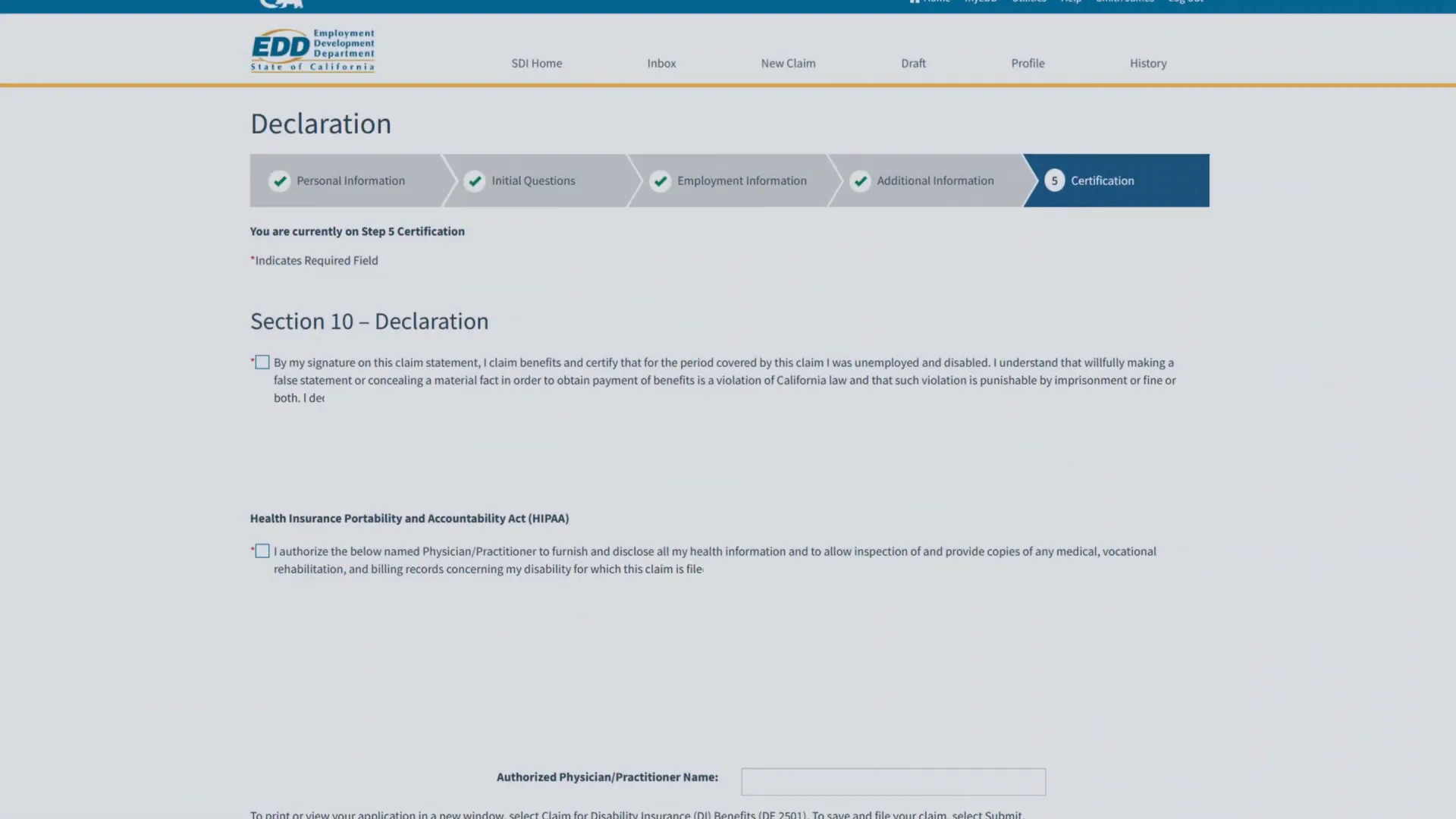
The certification step is the signing page: two checkboxes and your provider’s name.Watch at 1:34 - 9
Submit and save your receipt number
Once you submit, SDI Online confirms that your part of the application is in and issues a form receipt number beginning with R1. Save it — write it down, screenshot the confirmation or keep the email — because your licensed health professional needs that receipt number, your last name, your date of birth and the last four digits of your Social Security number to find the claim on their side. The same page starts the Determining Your Eligibility section: EDD mails documents about two weeks after it receives the completed claim, including a Notice of Computation (DE 429D) showing what your weekly payment could be. Getting that notice does not mean you are eligible — if you are eligible you also receive an Electronic Benefit Payment Notification (DE 2500E), and if you are not you get a Notice of Determination with appeal information.
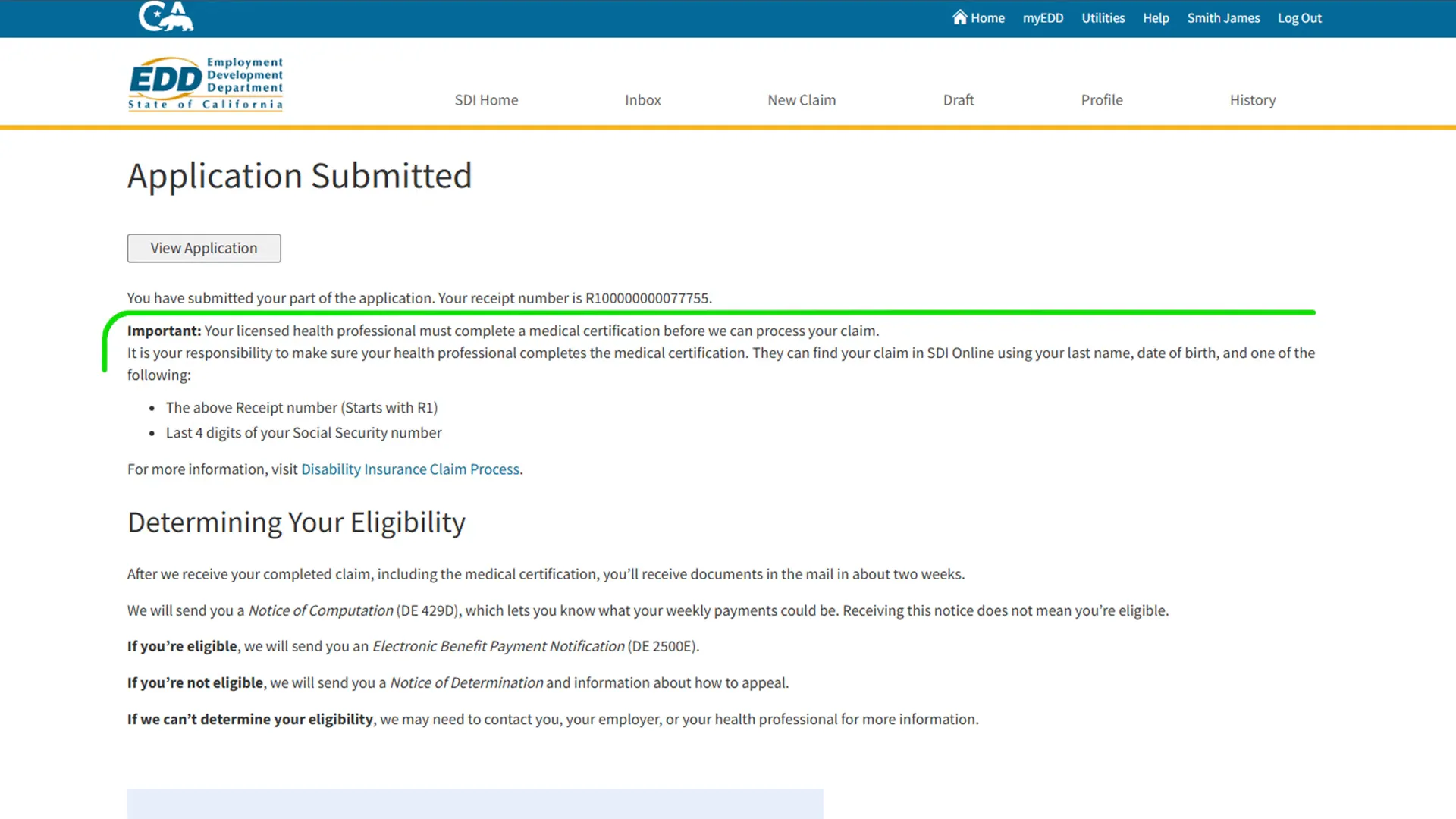
Screenshot the confirmation: the receipt number is what your provider needs.Watch at 1:42 - 10
Ask your licensed health professional to submit the medical certification
Your application is only half the claim; the other half is the medical certification, which your physician or other licensed health professional completes as Part B. They can submit it in SDI Online using your receipt number, or on the paper Part B of the DE 2501, and they must confirm your disability. EDD is blunt that it is your responsibility to make sure this happens, and the current filing page gives the outer limit as 49 days after your disability begins, warning that benefits can be lost after that. Talk to your provider about how they handle these, because practices differ. Do not submit the same claim twice — a duplicate submission delays the claim.
- 11
Choose how you want to be paid
SDI Online asks for a payment option while you are filing, and you can also set or change it at any time from your Profile by opening Edit Payment Option. The three choices are direct deposit into your own checking or savings account, the prepaid debit card, and mailed checks. EDD notes that if your bank does not accept direct deposit you will be paid on a prepaid debit card, and that a change you make while an application is still pending does not take effect until after your first payment — which is a reason to sort it out at filing time rather than waiting for the first payment to arrive.
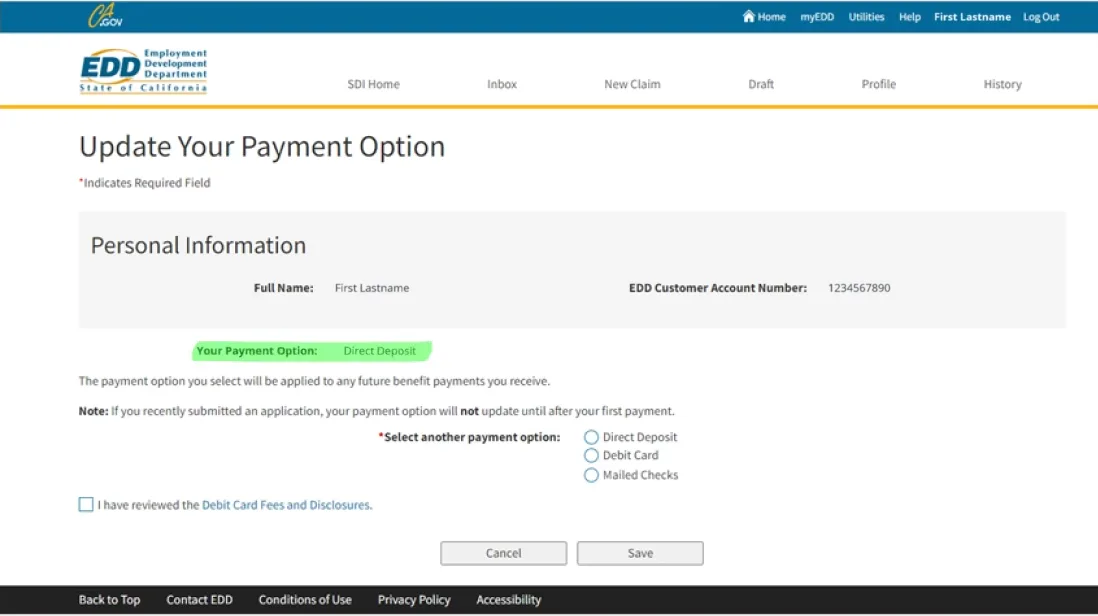
Direct deposit, the debit card or mailed checks — you can change your choice later.Watch at 1:40 - 12
Enter your routing and account numbers for direct deposit
For direct deposit you type the routing number (nine digits, printed at the bottom left of a check), the account number (5 to 17 digits) and the account number again to confirm it, then choose Checking or Savings. Before you can submit, you have to read the Direct Deposit Terms of Use and the Prepaid Debit Card Disclosures and tick the box confirming that you agree. Check the digits twice: a single wrong number sends the payment back and delays it, and the account has to be your own — EDD can only deposit into an account in your name.
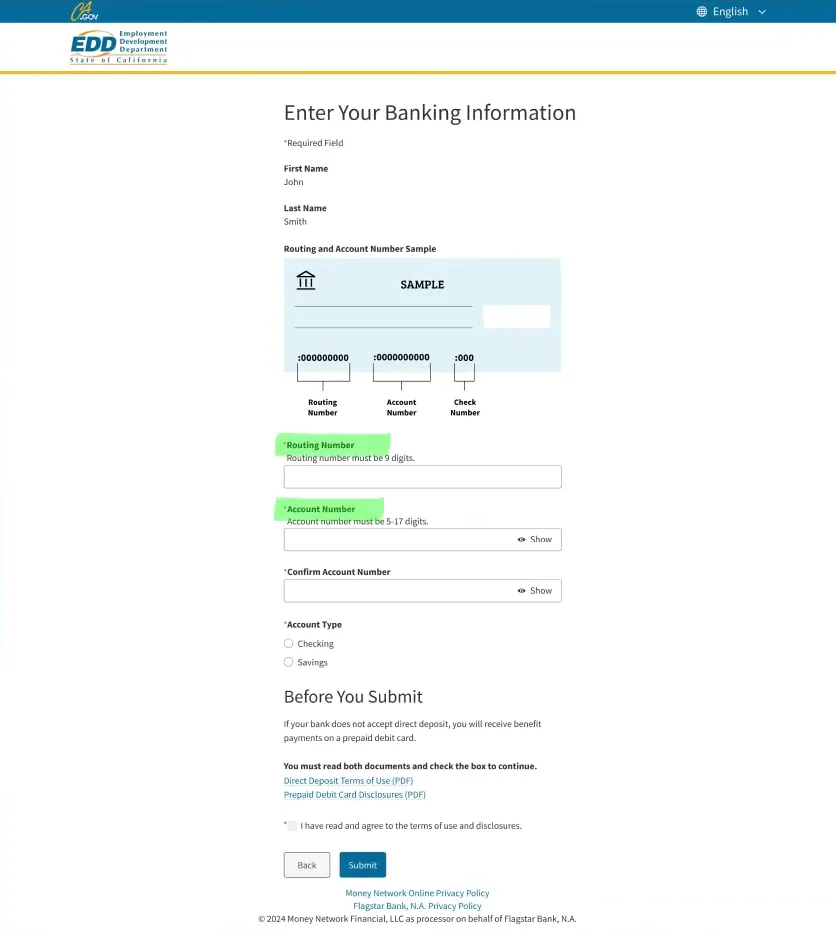
The sample check on the form shows exactly which numbers EDD wants.Watch at 1:15 - 13
Watch your claim status and EDD messages in SDI Online
The SDI Online home page answers most claim questions without a phone call. The Message Center mailbox holds EDD’s notices and anything that needs an action from you, the Apply for Benefits section starts a new claim or resumes a draft, and the application tables list each claim with its application number, current status, the date you applied and the receipt number. A status such as “Medical certification is needed” means EDD has your Part A and is waiting on your provider, not that anything is wrong. EDD says it usually tells you the status within 14 days of receiving both parts, and although your employer is notified that you filed a claim, your medical information is not shared with them.
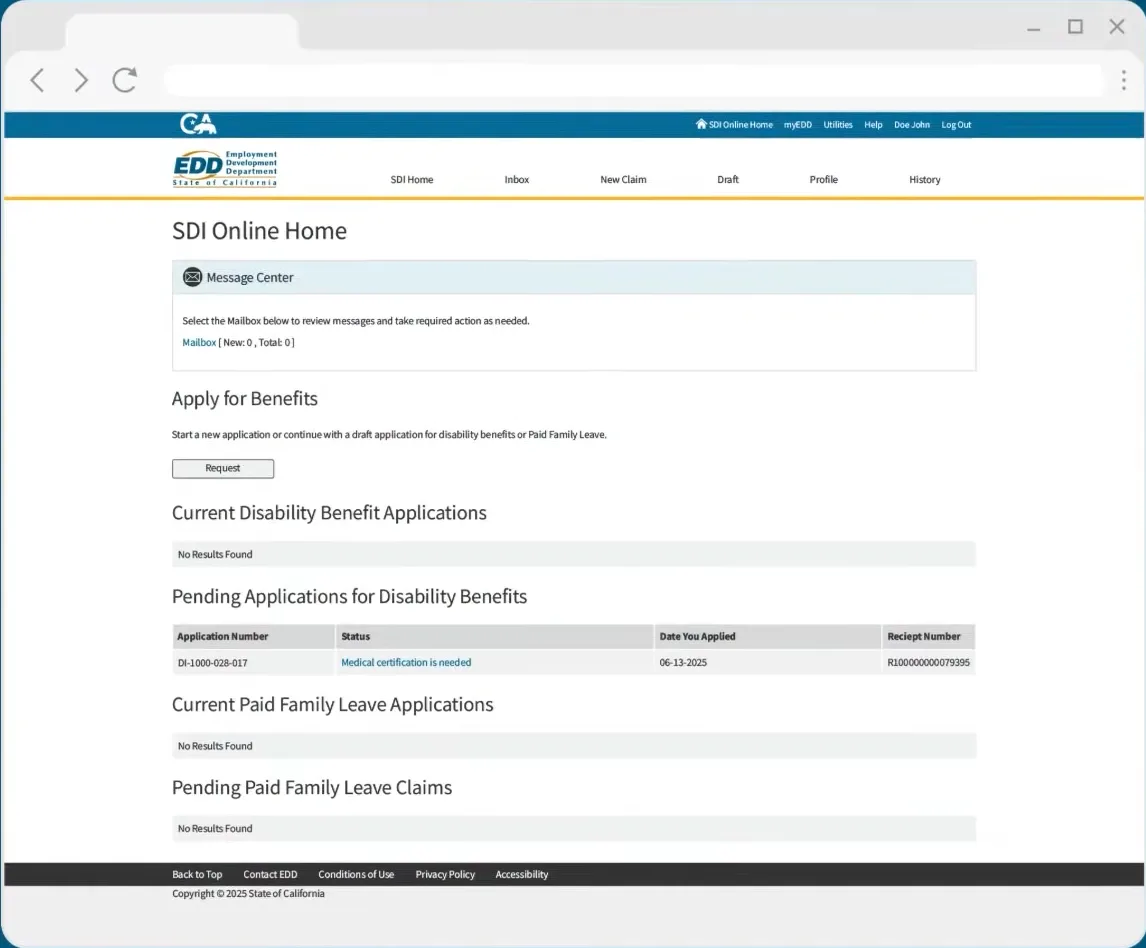
The home page is the scoreboard: status, application number, date applied, receipt number.Watch at 1:40 - 14
Put the three deadlines where you can see them
Three dates decide whether the claim survives. First the waiting period: you must serve an unpaid seven-day waiting period, and benefits begin only once you have been disabled for at least eight consecutive days. Second the filing window: apply no earlier than nine days and no later than 49 days after your disability begins, because a claim filed late can be disqualified. Third the medical certification, which has its own deadline and is your responsibility to chase. EDD will not process the claim until it holds both your Part A and your provider’s certification, so the gap between your submission and theirs is where claims most often stall — check the status in SDI Online rather than assuming it is moving.
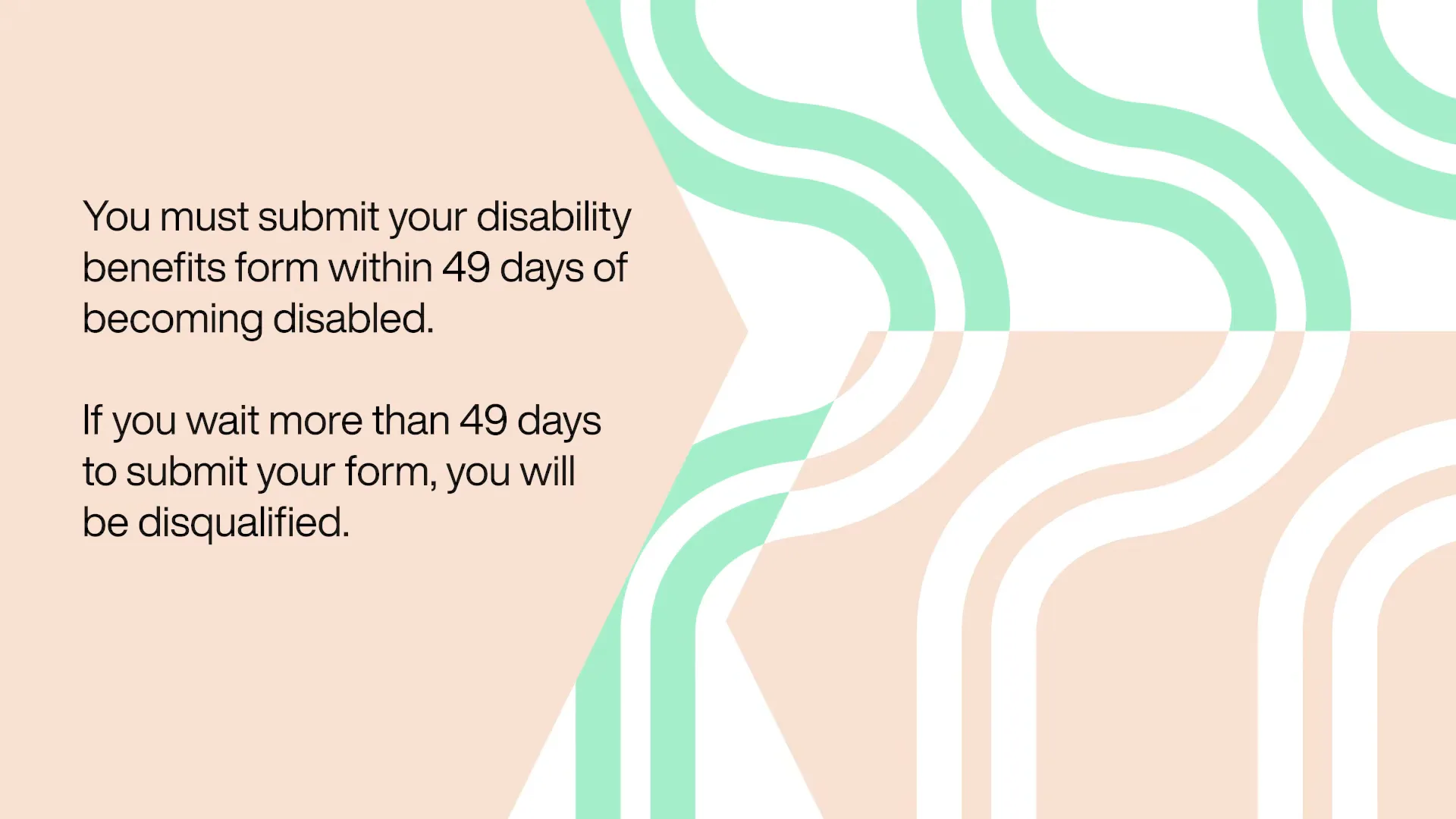
An official EDD step illustration, not a live screen capture, of the 49-day filing rule.Watch at 3:58
Frequently asked questions
- Who qualifies for short-term disability in California?
- Disability Insurance is for a non-work illness, injury, surgery, pregnancy or childbirth that stops you working. You must be unable to do your regular work for at least eight days, lose wages because of it, be employed or actively looking for work when the disability begins, and have earned at least $300 in base-period wages with SDI withheld (the CASDI line on your paystub). You also have to be under the care of a licensed health professional within the first eight days and stay under treatment. Citizenship and immigration status do not affect eligibility.
- How much does California SDI pay, and for how long?
- Your weekly benefit amount is about 70–90% of the wages you earned five to 18 months before your claim start date, depending on your income, up to the maximum weekly benefit amount for the year. EDD calculates it from the quarter with your highest base-period wages. The most you can receive is 52 weeks of benefits, or the wages in your base period if that is less. The first seven days of a new claim are an unpaid waiting period, and most payments are issued within two weeks of a properly completed claim.
- When can I file, and what happens if I file late?
- Apply no earlier than nine days and no later than 49 days after your disability begins. EDD says a claim submitted after the 49-day window can be disqualified, which is why the date your disability started matters so much. The medical certification has its own deadline: it is your responsibility to have your provider submit it, and the current EDD filing page puts the limit at 49 days after the disability begins. Some older EDD videos mention 30 days for the certification — treat 49 days as the deadline EDD states today, and file as early as you can.
- How do I check my SDI claim status?
- Log in to myEDD, open SDI Online and read the home page: the Message Center mailbox holds EDD’s notices and any action you owe, and the application tables show the application number, the status, the date you applied and the receipt number. A status such as “Medical certification is needed” means EDD has your Part A and is waiting on your provider. EDD says it usually contacts you with the status within 14 days of receiving both parts. If something is wrong that the status does not explain, call EDD Disability Insurance at 1-800-480-3287.
- Do I need a doctor to certify the claim?
- Yes. Your application is only half the claim. A licensed health professional — a physician, an authorized medical officer, a chiropractor, podiatrist, optometrist, dentist, psychologist, nurse practitioner, physician assistant or licensed midwife, among others — has to confirm your disability as Part B, either in SDI Online using your receipt number or on the paper Part B of the DE 2501. EDD will not process the claim until it receives the certification, so give your provider the receipt number, your last name, your date of birth and the last four digits of your Social Security number as soon as you submit your part.
Keep reading
Educational information only, not legal advice. Eligibility rules, payment amounts and deadlines come from the California Employment Development Department (EDD) and the official SDI Online walkthrough above; the maximum weekly benefit amount and filing details change, so confirm your own claim with EDD at 1-800-480-3287 or inside SDI Online.