Video walkthrough
How to File OWCP Form CA-7 Online in ECOMP
A federal employee with wage loss files Form CA-7, not the CA-1. This walkthrough follows one claimant through all seven sections of the CA-7 inside ECOMP, from the dashboard to the SIGN AND FILE button, with every screenshot taken from the recording and deep linked to its second.
The short answer
- A CA-7, “Claim for Compensation”, is filled in inside ECOMP at ecomp.dol.gov — open your case, go to the FORMS tab and use EDIT / REVIEW on the draft rather than starting over.
- The form has seven sections: Basics, Compensation, Non-Federal Employment, First Injury Claim, Dependents, Other Claims & Benefits and Attachments.
- Section 1 comes pre-filled from your OWCP case file; check the mailing address and the supervisor’s agency e-mail before you move on.
- Claim leave without pay for the pay periods you were out of work, and file a new CA-7 every two weeks while the disability continues.
- Leave Buy Back needs Form CA-7b completed by your agency and an intermittent period needs Form CA-7a; compensation itself must be claimed within three years of the injury.
Source video
HOW TO FILE CA-7 WITH ECOMP/OWCP | Want To Get PAID After Your USPS Injury?
GO HEAD FIRST — Terrence Brinson (USPS letter carrier recording his own ECOMP session)
Screenshots are frames from the video above, cut to the portal and redacted where they showed the claimant’s name, address, file number, injury date or telephone number. The written steps are ours and were checked against the official DOL OWCP pages linked here — the FECA FAQ and the “Form CA-7 – Agency’s Responsibilities” guidance — which are the authoritative source where anything differs. www.dol.gov/agencies/owcp/FECA/fec-faq
Step-by-step walkthrough
Thirteen steps in the order you would actually do them, from the ECOMP dashboard to the certification screen. Each screenshot deep links to the second of the video it came from.
- 1
Open ECOMP and read the dashboard before you touch a form
A CA-7 is not a PDF you download — it is a form you fill in inside ECOMP, the Department of Labor’s Employees’ Compensation Operations and Management Portal at ecomp.dol.gov. The dashboard is the starting point: the NEW CLAIM link starts a CA-1 or CA-2 for a new injury and the CA-7 path for an existing claim, and the Documents link is where correspondence is uploaded. Every claim you have ever had is listed in the Cases tab, unfinished forms sit in Draft Forms, and Action Required is the tab that matters most — if OWCP needs something from you it appears there, and the page warns that not responding can delay or suspend benefits. The DOL’s own FAQ makes the same point from the other end: once a case exists, your claim number is shown on your ECOMP dashboard.
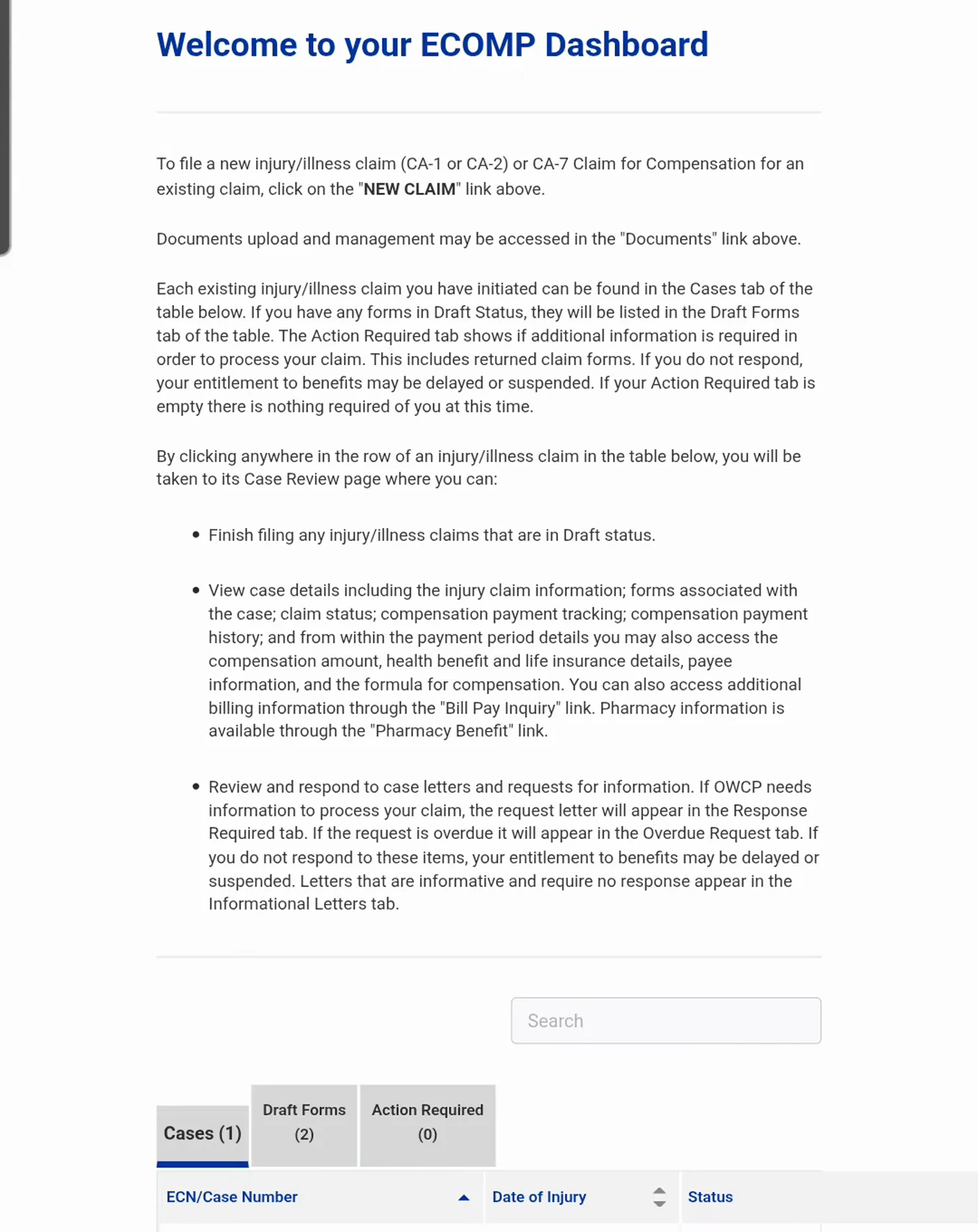
Three tabs decide what you do first: Cases, Draft Forms and Action Required.Watch at 0:20 - 2
Open your case and learn the five tabs
Click the row for the claim on the dashboard and ECOMP opens the Case Review page. Across the middle sit five tabs: CASE HISTORY, FORMS, LETTERS, CASE IMAGING — every document in the file, which you can open, download or print — and CASE ESCALATION. Under them are three expandable panels: CASE STATUS, CA-7 TRACKING and COMPENSATION PAYMENT HISTORY. The DOL FAQ describes this same screen as the Claimant Query System, now part of ECOMP, which gives injured workers 24-hour access to case status, accepted conditions, address of record, and compensation payments and tracking. Learn where these live now: after filing, this is the screen you check instead of waiting on the phone.
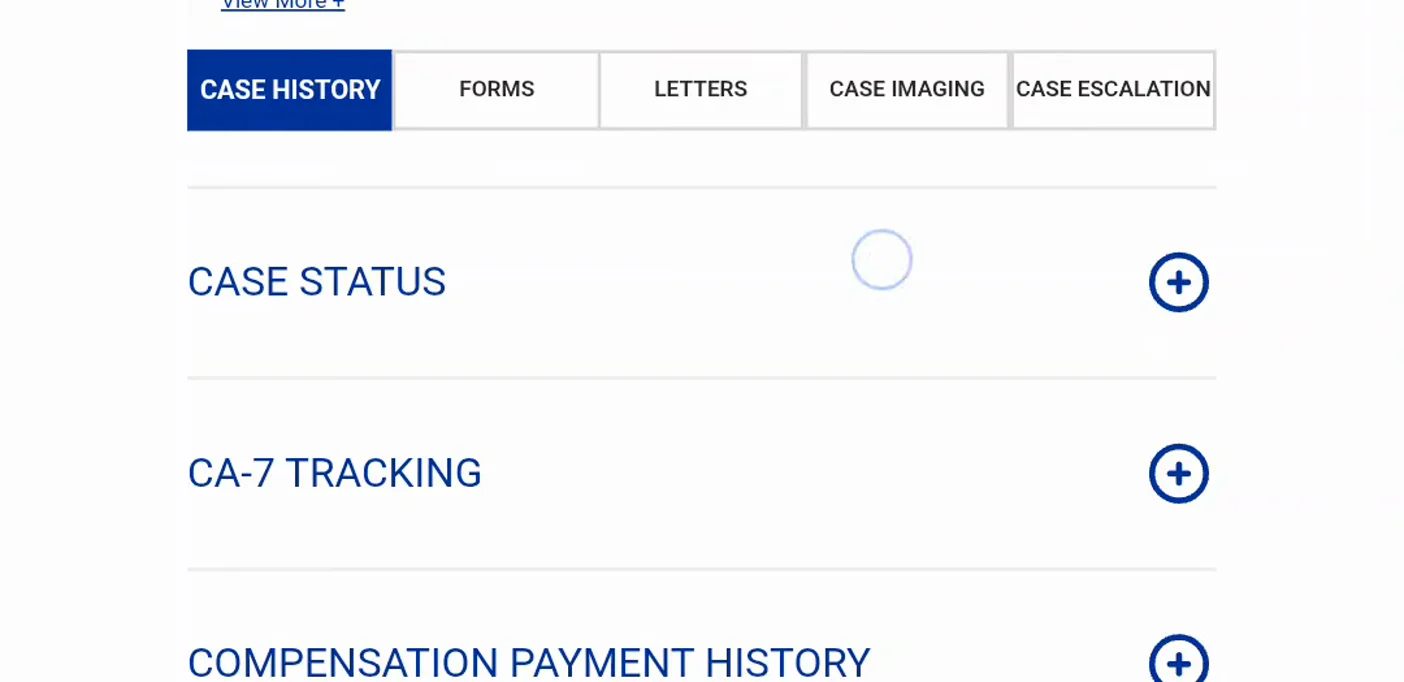
Five tabs across, three trackers down — this is the case file.Watch at 0:36 - 3
Find your unfinished CA-7 on the Forms tab
The FORMS tab lists every form on the claim and ECOMP labels each one with a status badge. The card in the video is still in Draft: it carries a Draft badge, the note that the form has not been submitted yet, the date of event, and an EDIT / REVIEW link with VIEW, Get PDF and Delete Claim beside it. The presenter deliberately uses EDIT / REVIEW rather than Start Form, because a CA-7 he had already begun was waiting there — typed work is kept as a draft, so you never start over. The second card underneath is marked Received by DFEC, which is what a submitted form looks like once OWCP’s Division of Federal Employees’ Compensation has it. Read the badge before you click: the two cards lead to different outcomes.
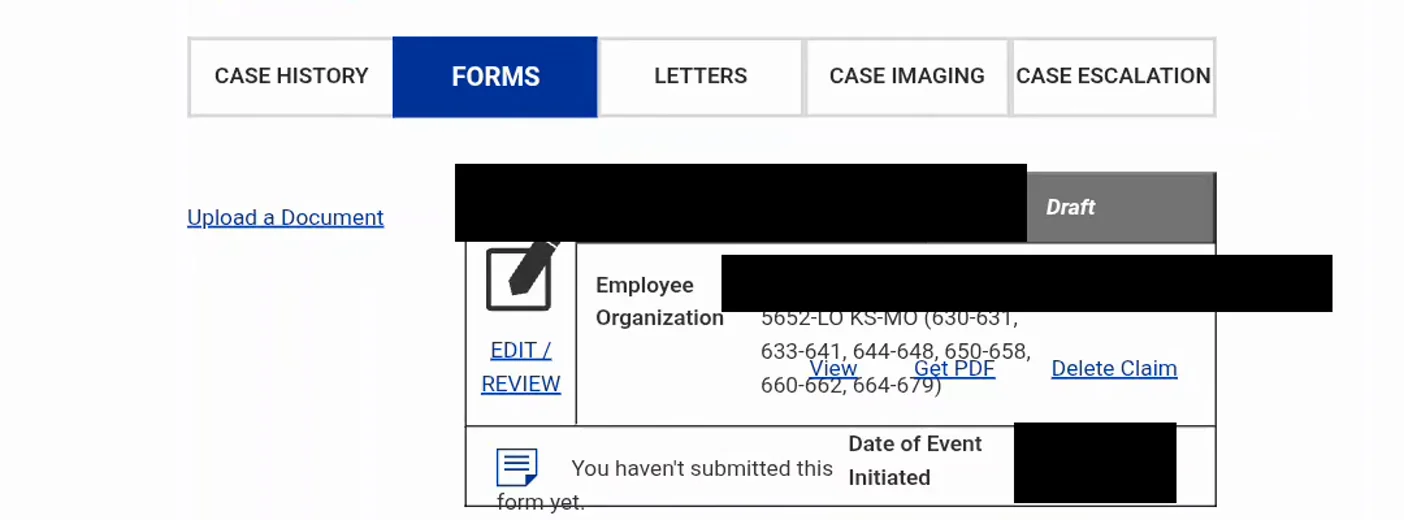
A draft form and a filed form look different — check the badge.Watch at 0:52 - 4
Read the seven-step bar: what a CA-7 actually asks for
The CA-7 is one form split into seven sections, and the progress bar across the top is the map: 1 BASICS, 2 COMPENSATION, 3 NON-FEDERAL EMPLOYMENT, 4 FIRST INJURY CLAIM, 5 DEPENDENTS, 6 OTHER CLAIMS & BENEFITS and 7 ATTACHMENTS. A blue check means the section is complete, a grey X means ECOMP skipped it because it did not apply, and the numbered circle shows where you are. In the video the bar shows sections 5 and 6 crossed out and the rest checked — that is a claim with no dependent changes and no other federal benefits to report, not an unfinished form. Walk the bar left to right and answer every section it leaves open; the sections it closes are the ones ECOMP already knows do not apply to this claim.

Seven sections, and the bar tells you which ones are still open.Watch at 1:16 - 5
Check the pre-filled Employee Basics before anything else
Section 1 comes back already filled in from the OWCP case file, and the portal says so: some of the fields have been filled in for you from the information already contained in your OWCP case file, and if corrections are needed you should update the appropriate fields. The identification block carries the name, mailing address, OWCP file number, date of injury, a Social Security number that ECOMP will not display in full, and the telephone number. Everything except the SSN can be corrected here, and the mailing address matters most because it is the address OWCP uses for correspondence. Below it, WHO SHOULD REVIEW THIS FORM? asks for the immediate supervisor’s e-mail, which must sit on a valid agency domain — the postal claim in this recording accepts @usps.gov addresses — and that supervisor is the person who later confirms your pay information. Identifying values are blanked out in this screenshot.
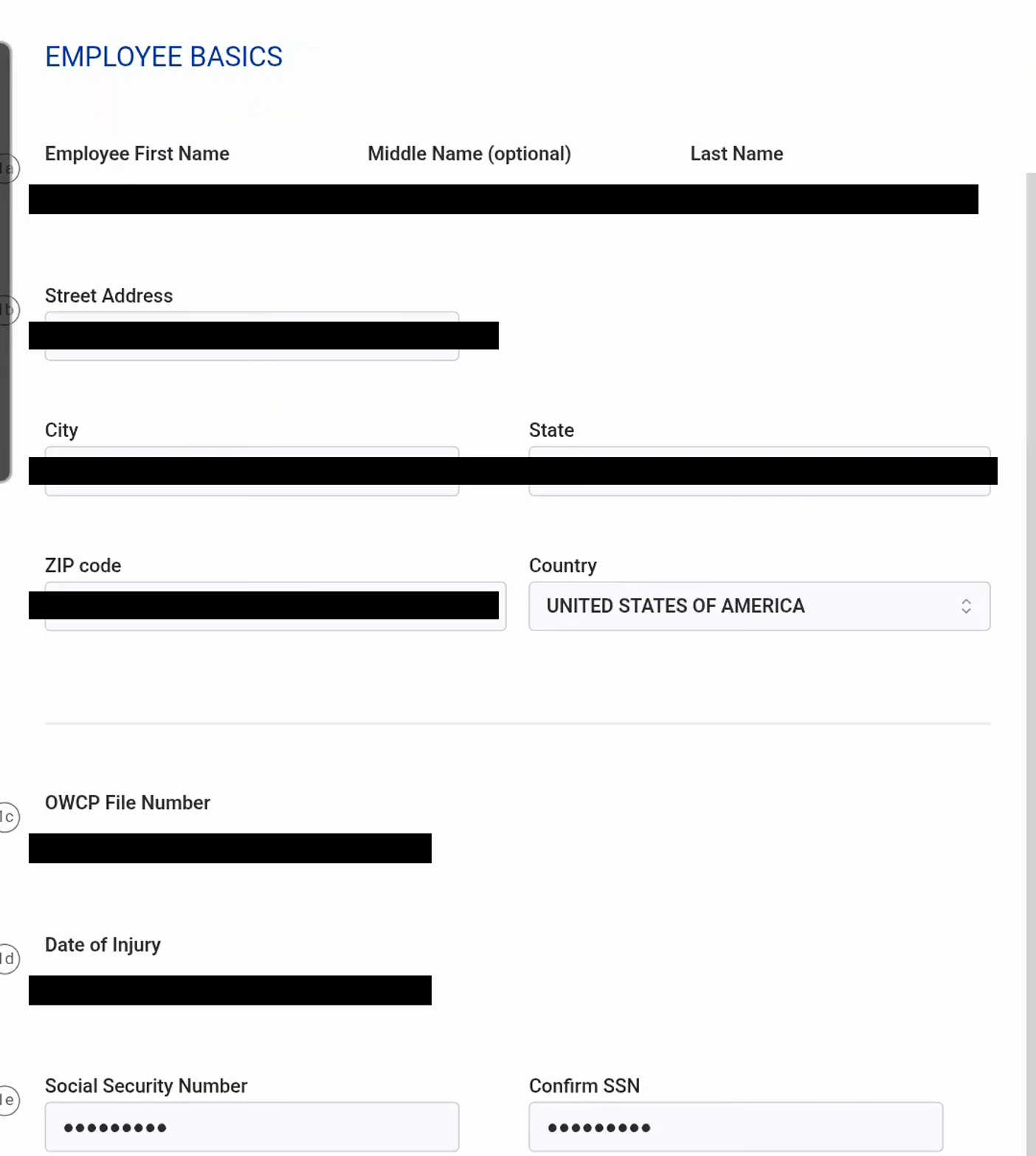
Most of this was typed for you — read it, do not re-key it.Watch at 1:00 - 6
Claim the leave-without-pay period, one pay period at a time
Section 2 is where the money is claimed, and Leave without Pay is the box most first CA-7s use. Tick it, then enter the From and To dates of the period you were off work because of the accepted condition — in the recording the presenter claims a single two-week postal pay period. Intermittent is a separate choice: use it when the days you missed were not one solid block, and remember that an intermittent period also requires Form CA-7a, the Time Analysis Form. The DOL instructs agencies to have an employee file the CA-7 in ECOMP once continuation of pay has run for at least 30 days and it looks like disability will exceed 45 days, or as soon as pay stops, and the form is then filed at two-week intervals for as long as the disability continues.
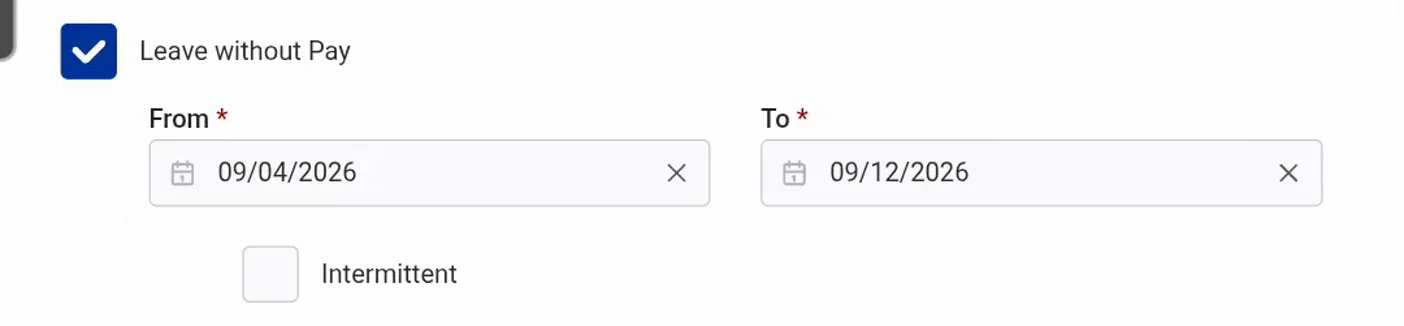
One checkbox per benefit, one date range per row.Watch at 1:16 - 7
Tick Leave Buy Back, Other Wage Loss or Schedule Award only when they apply
The other three boxes in section 2 claim different things. Leave Buy Back covers leave you already used for the disability: the tool tip on screen is explicit that your employing agency must complete Form CA-7b and share it with you for review and signature, and that CA-7b is not currently available in ECOMP. If your agency allows buy back you repay the difference between the leave you were paid, at 100% of pay, and the compensation you would have received — 66 2/3%, or 75% with one eligible dependent. Other Wage Loss needs a type written in, something like a downgrade or loss of night differential, plus its own date range. Schedule Award is a permanent-impairment benefit claimed with an impairment rating after maximum medical improvement, so most first CA-7s leave it unticked and file for it later. Note the Saving indicator: ECOMP autosaves the draft while you work.
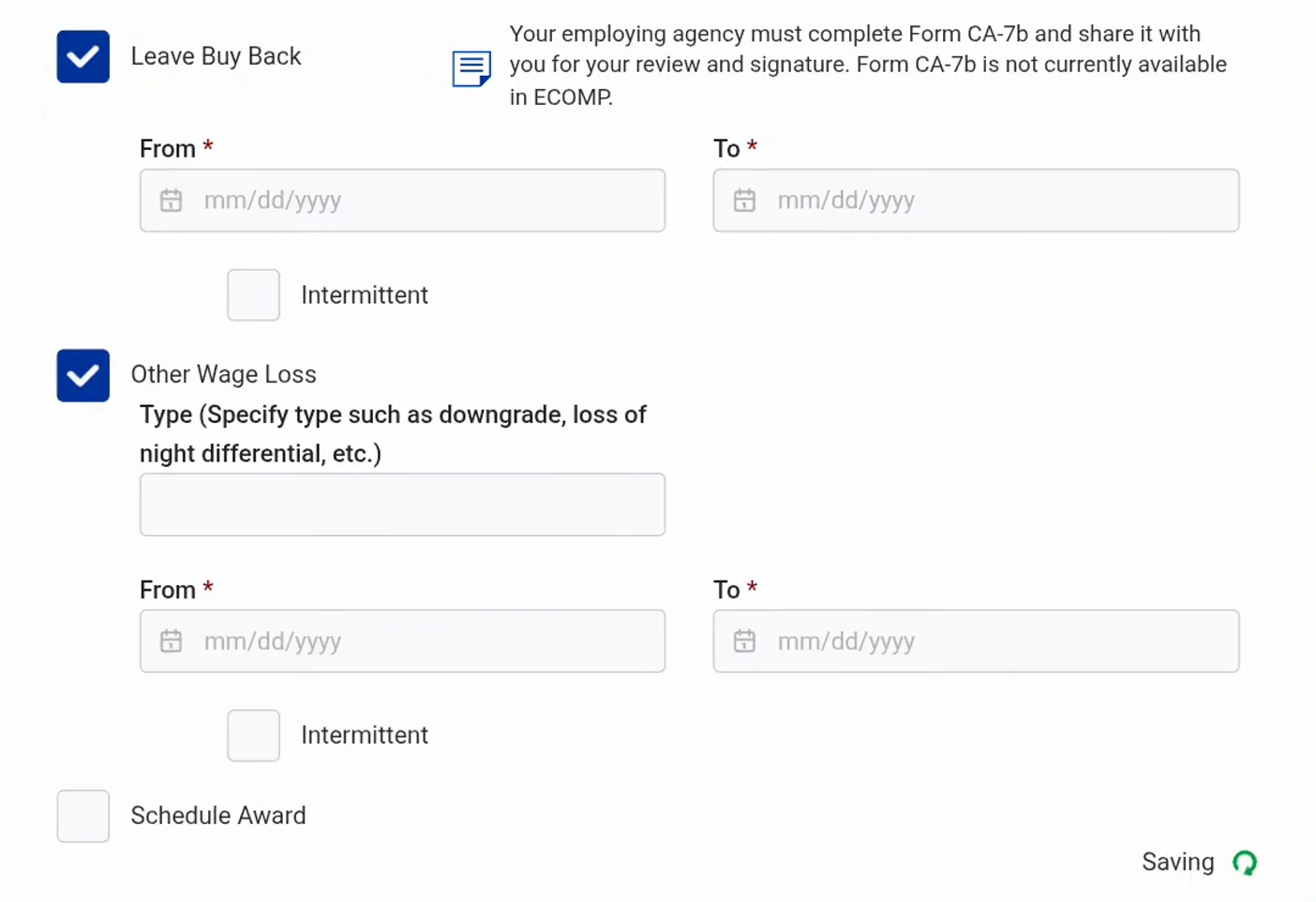
Three other benefits live on this screen — most claims tick one.Watch at 1:40 - 8
Answer the non-federal employment question honestly
Section 3 asks whether you worked outside your federal job during the periods claimed in the Compensation step, and the paragraph above it explains the stakes: you must report any and all earnings from employment outside the federal job — salary, wages, income, sales commissions, self-employment, odd jobs, involvement in business enterprises and military service all count — and falsely concealing employment or failing to report income may result in forfeiture of compensation benefits and criminal prosecution. In the recording the answer is No, which is the honest answer for someone who has not worked since the injury. If you did work, answer Yes and expect OWCP to deduct those earnings from the compensation claimed; the deduction is the point of the question.
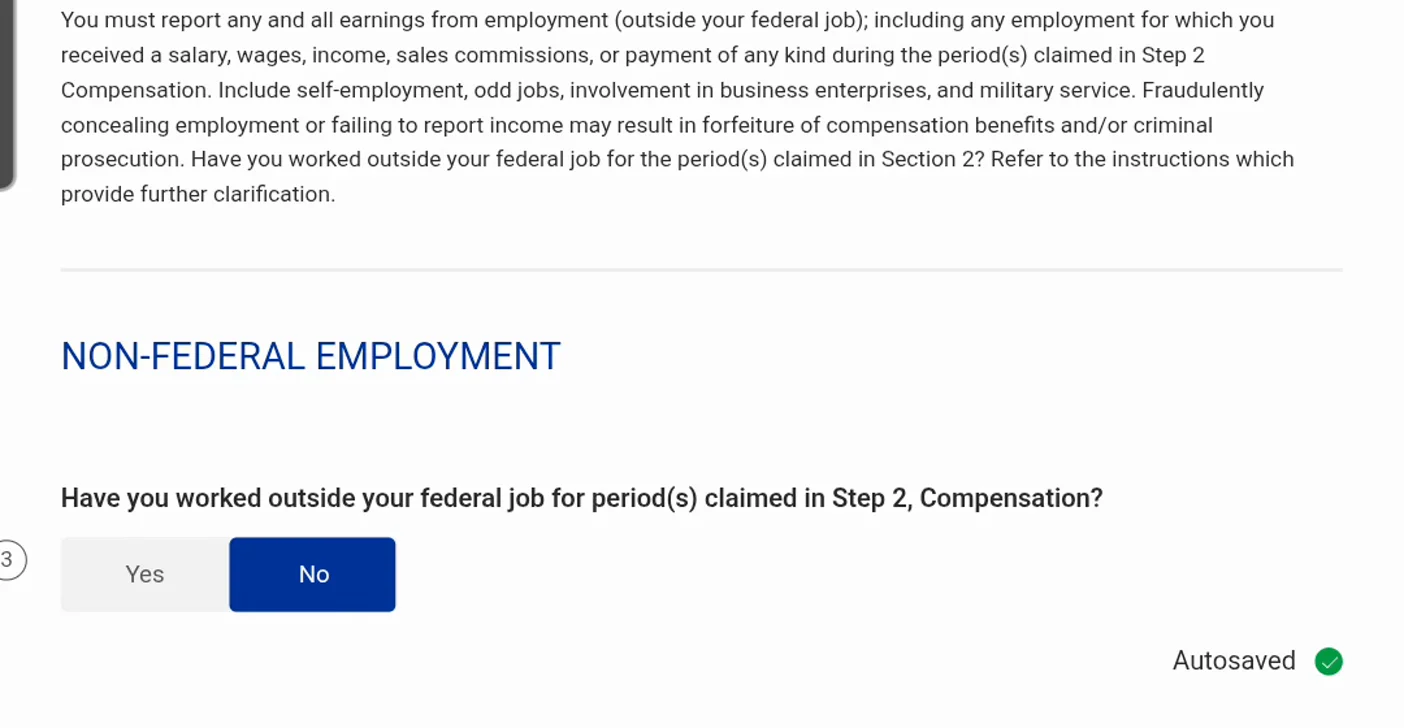
This one is a legal statement, not a formality.Watch at 1:48 - 9
Answer the first-claim and dependent questions
Section 4 holds two questions with consequences. The first is whether this is the first CA-7 you have filed for this injury; the presenter answers No because an earlier CA-7 already exists on the claim, and that answer decides whether ECOMP treats the filing as an initial claim or a continuation. The second asks whether anything changed since your last CA-7 in your dependents, your direct deposit information, your Civil Service or other federal retirement or disability claim, or your Veterans Affairs claim. That is not small print: OWCP pays 66 2/3% of the pay rate with no eligible dependents and 75% with at least one, so a newly claimed dependent changes every payment that follows. If you answer Yes, have the paperwork ready — a court order for a dependent belongs in the attachments section, and a direct deposit change goes on Form SF-1199a, which the DOL has injured workers upload to ECOMP.
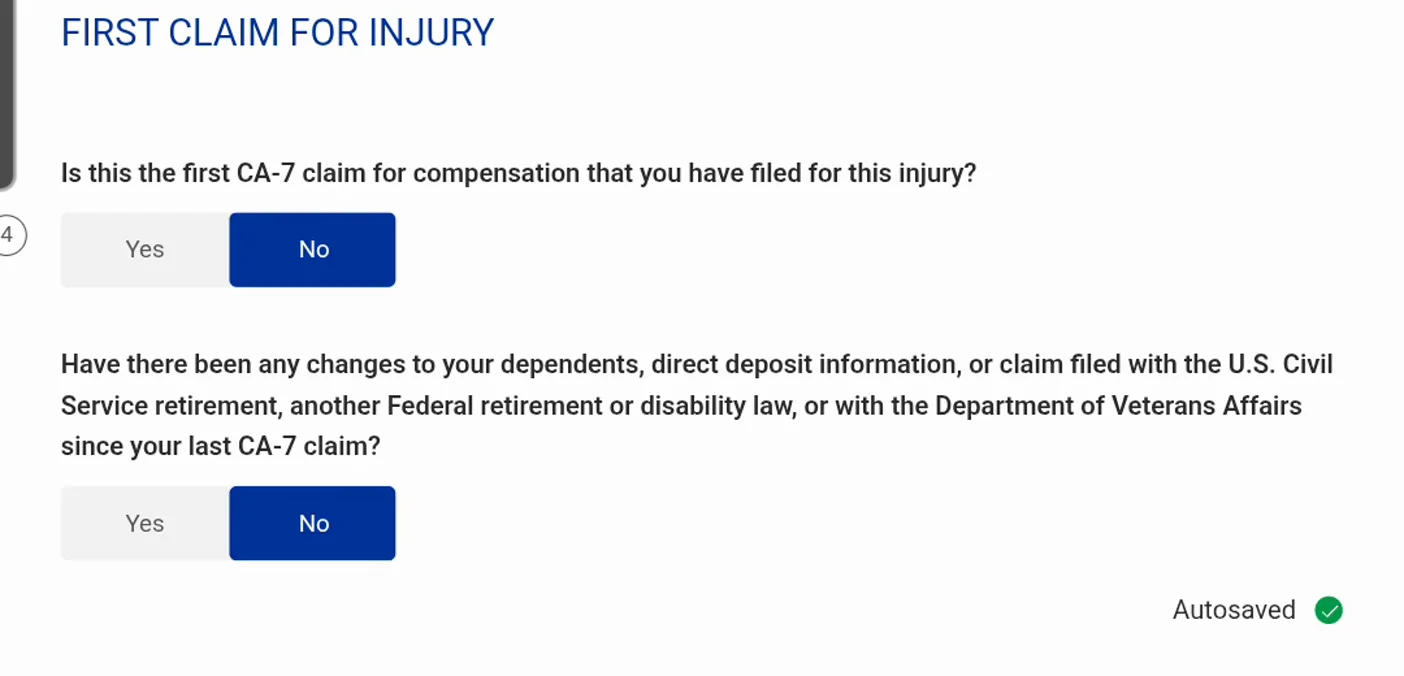
Dependents decide 66 2/3% versus 75% — answer accurately.Watch at 2:04 - 10
Attach the documents that support the period you claimed
Section 7 is marked optional, and it is optional in the portal’s sense: you can submit the CA-7 now and add documents later. But the DOL expects medical documentation supporting any period of disability claimed, and the screen names two other things that belong here — Form SF-1199A if you are setting up direct deposit, and a court order for any dependent listed in the previous step. Read the portal rules once: maximum file size 5MB, no more than 20 pages per document, one document per upload, a Document Control Number assigned to each upload, and every upload converted to black-and-white. Accepted formats are jpeg, jpg, gif, png, txt, tif, tiff, rtf, pdf, doc and docx, and the page asks you to allow four hours for processing before the file appears on the case.
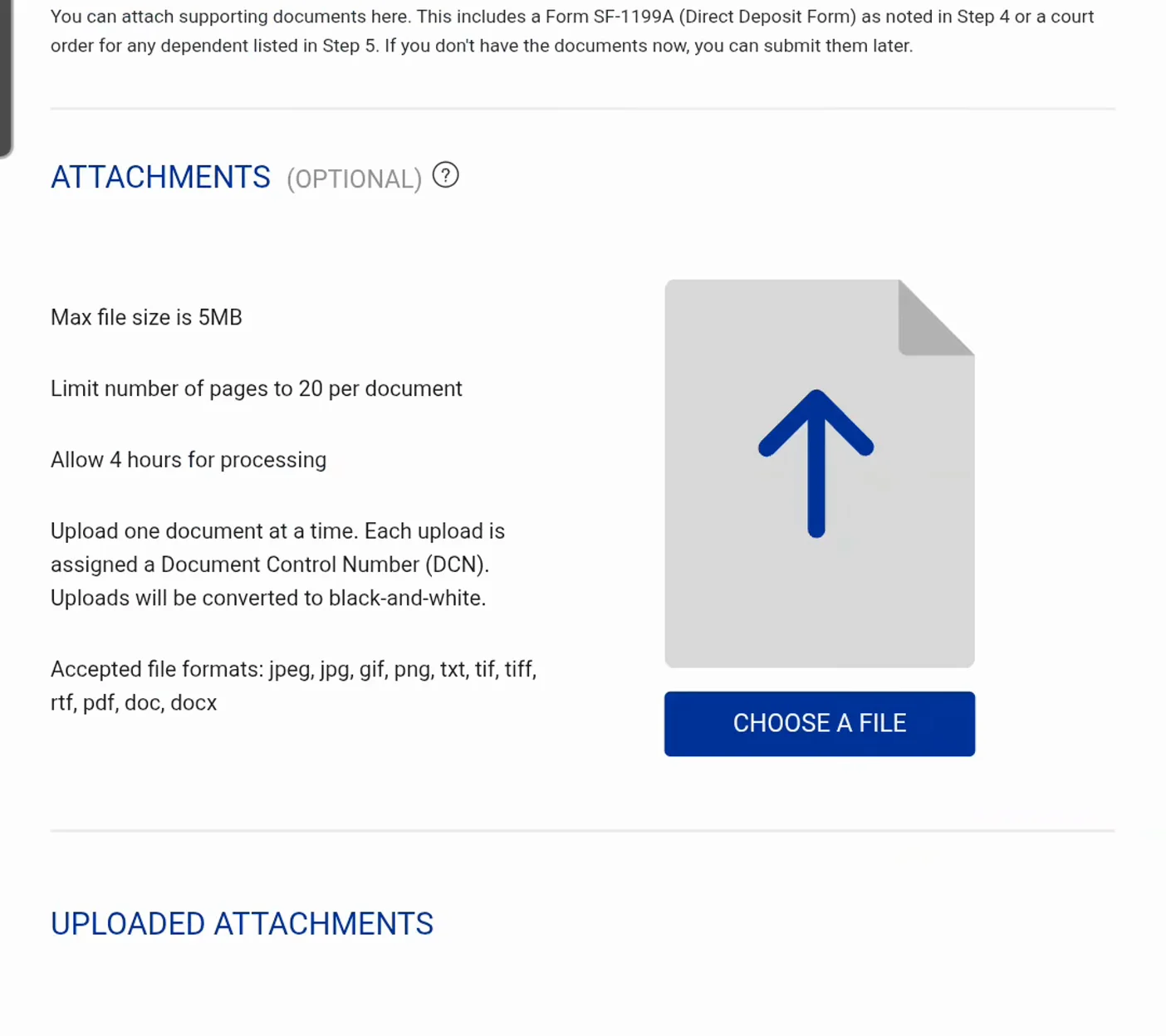
Optional, but the medical evidence is what pays the claim.Watch at 2:06 - 11
Read the summary back, and use the Edit links
Before the signature, ECOMP flattens the whole form into a review page headed “Review this information carefully before continuing.” Each block repeats what you entered — EMPLOYEE BASICS, COMPENSATION CLAIMED, NON FEDERAL EMPLOYMENT, FIRST TIME CLAIM, ATTACHMENTS — and each block carries an Edit link on the right. This is the cheapest place to catch a wrong mailing address or a date range that covers the wrong pay period, because fixing it here updates the whole form. Slow down on the identification block in particular: name, address, OWCP file number, date of injury, the masked Social Security number, home telephone, employee e-mail and the government organization and activity codes all come from the case file, and all of them can be corrected while the form is still a draft. Identifying values are blanked out in this screenshot.
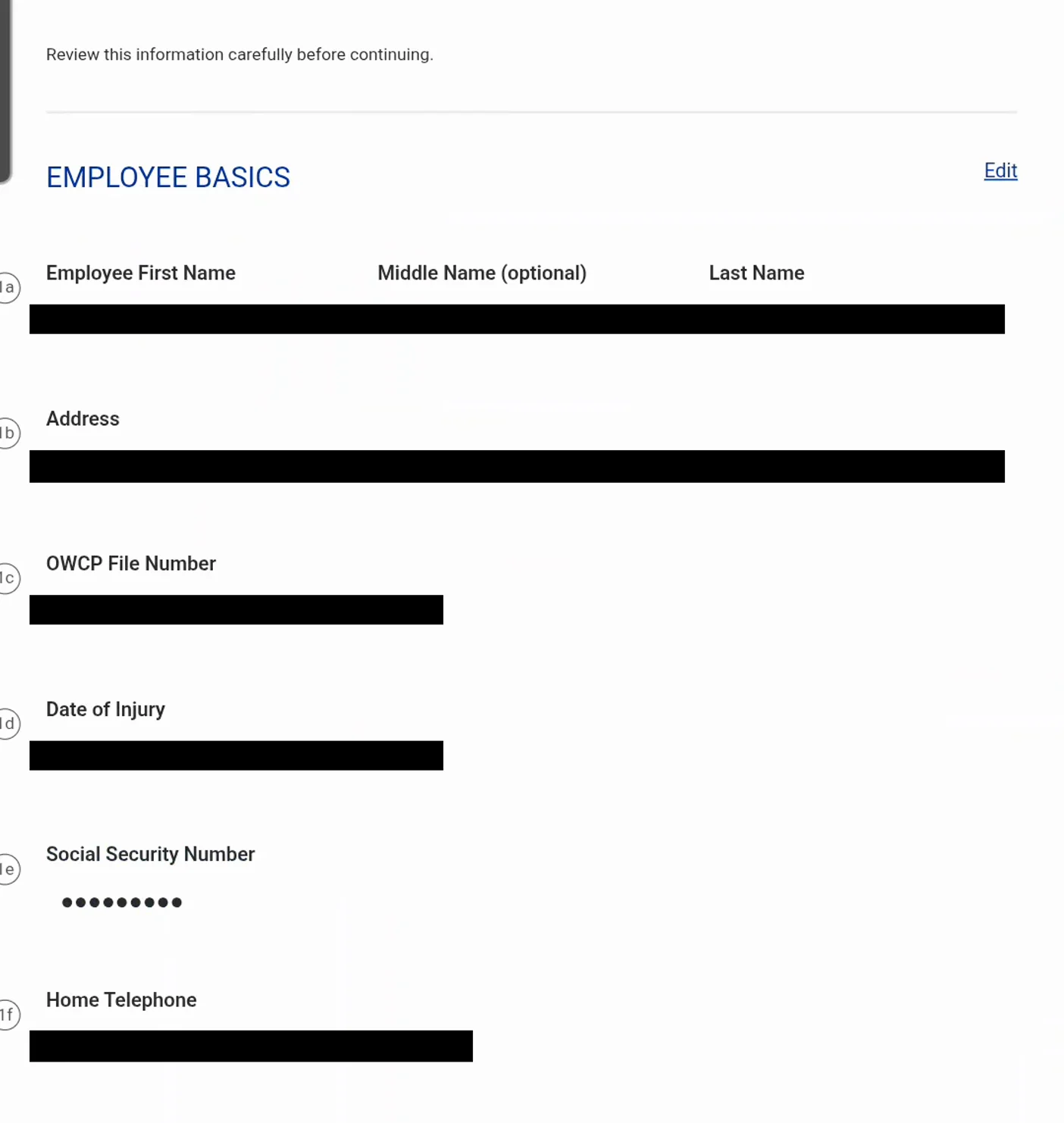
Every block on the review page has its own Edit link.Watch at 2:12 - 12
Check what the summary says you are claiming
The COMPENSATION CLAIMED block is the one to read line by line. The video’s summary shows the leave-without-pay range that was just entered, while Leave Buy Back, Other Wage Loss and Schedule Award all read NO RESPONSE GIVEN — because those boxes were ticked and unticked again as the presenter demonstrated them, leaving no dates behind. That is a useful tell: NO RESPONSE GIVEN means a question on the form went unanswered, and an unanswered compensation question is a common way a claim comes back to the claimant. Below it, NON FEDERAL EMPLOYMENT and FIRST TIME CLAIM restate the two previous sections, and the ATTACHMENTS block carries its own Add/Modify Attachments link so you can still add a document here.
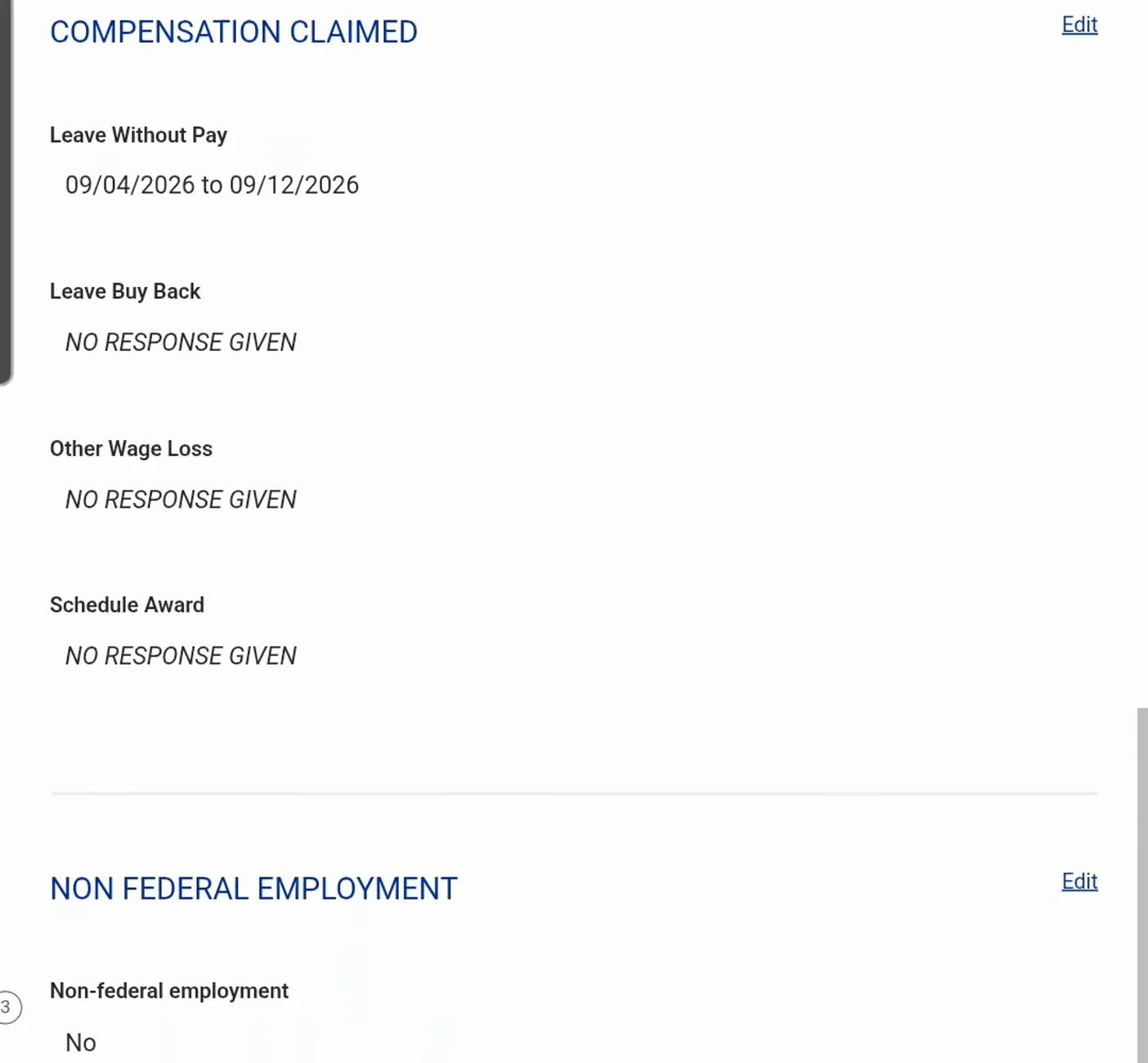
No Response Given is a warning sign, not an answer.Watch at 2:18 - 13
Sign and file: clicking the button is the signature
The last screen is the certification: I hereby make claim for compensation because of the injury sustained by me while in the performance of my duty for the United States, and I certify that the information provided above is true and accurate to the best of my knowledge and belief. Under it, in red, sits the sentence that turns a click into a signature — submitting this form is considered the same as signing it. Press SIGN AND FILE only when every section reads the way you want it, because from here the form leaves your hands. The DOL’s instruction to agencies is that the completed CA-7 must be forwarded to OWCP within five work days of your signature date, and if you are still disabled beyond the period you claimed you file another CA-7 at two-week intervals. One deadline sits behind all of it: a claim for compensation under FECA must be filed within three years of the date of injury.
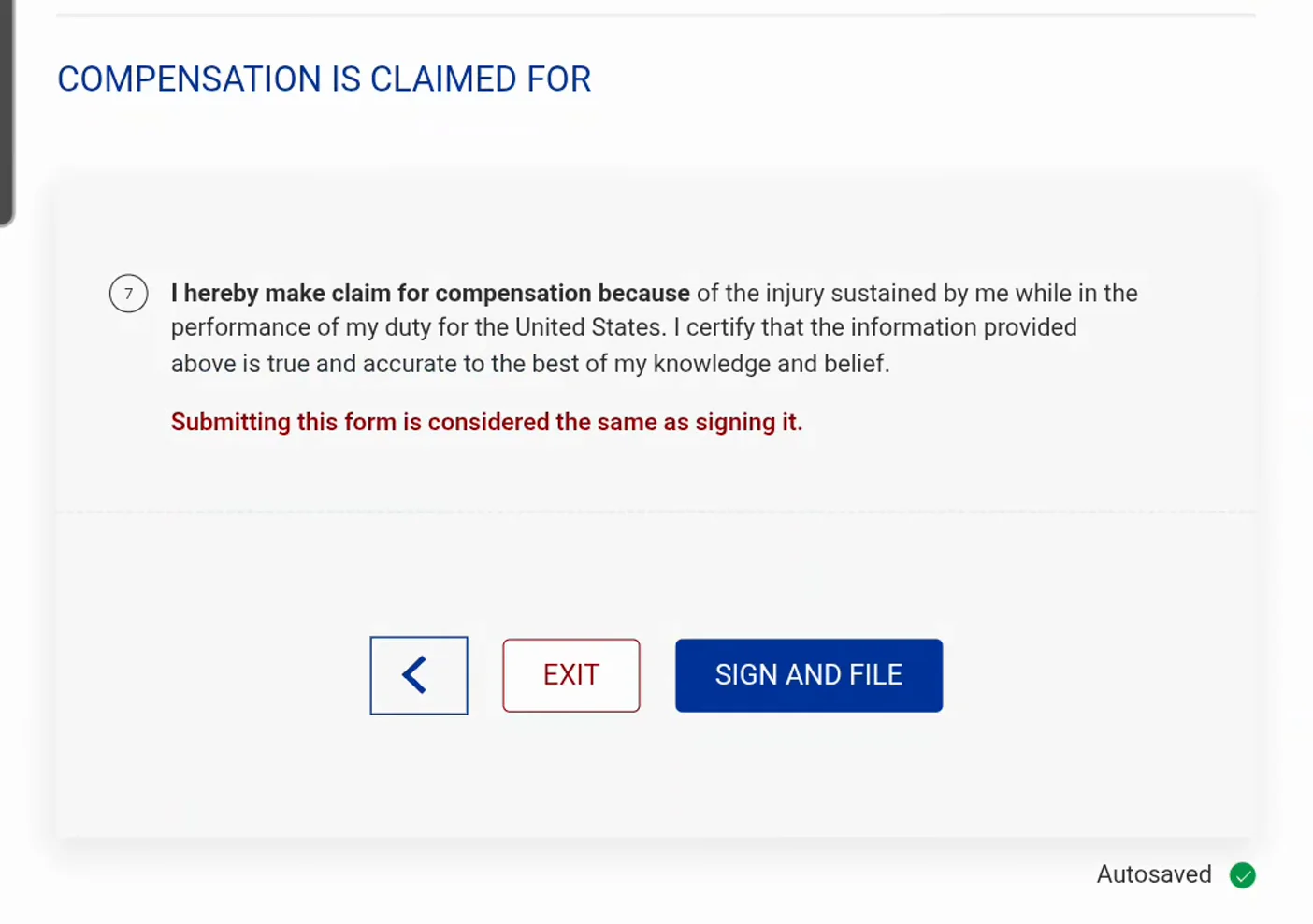
Submitting is signing — there is no separate signature page.Watch at 2:28
FAQ
- Do I file the CA-7 in ECOMP, or give it to my agency?
- Both, in that order. You complete and submit the form in ECOMP, and your employing agency then completes its portion and forwards the whole packet to OWCP — the DOL FAQ describes exactly that sequence for a CA-7, and the agency guidance adds that the completed form should reach OWCP within five work days of your signature date. ECOMP is the filing system; the agency is the courier and, for wage information, the certifier.
- How is a CA-7 different from the CA-1 or CA-2?
- The CA-1 (traumatic injury) and CA-2 (occupational disease) are notices of injury: they put your agency and OWCP on written notice and open the claim. The CA-7 is the money form — it claims compensation for wage loss once you are in leave-without-pay status because of an accepted condition, usually after continuation of pay has run out. A claim can have one CA-1 and many CA-7s; this page covers the CA-7, and the CA-1 walkthrough is a separate guide.
- How often do I have to file a CA-7?
- The DOL tells agencies to have employees file the first CA-7 in ECOMP once continuation of pay has run at least 30 days and disability looks like it will exceed 45 days, or as soon as pay stops. After that the form is filed at two-week intervals for as long as the disability continues, so most claimants file one per pay period. Each CA-7 claims a specific date range; nothing is paid for a period nobody claimed.
- What if the days I missed were not continuous?
- Tick Intermittent on the compensation row and file Form CA-7a, the Time Analysis Form, alongside the CA-7. The DOL FAQ states the pairing plainly: if the period claimed on the CA-7 is intermittent, a CA-7a is also required. The CA-7a breaks the absence down day by day so OWCP can pay part-days and rotating schedules correctly.
- Is there a deadline for a CA-7?
- Yes. Under FECA a claim for compensation must be filed within three years of the date of injury, starting from the injury date for a traumatic injury and from awareness for a latent condition (5 U.S.C. 8122; 20 C.F.R. 10.100–10.101). Filing late is not automatically fatal — the DOL notes compensation may still be paid if written notice was given within 30 days — but timeliness is decided by OWCP during adjudication, so file as soon as pay stops rather than testing the limit.
- How long until the first payment lands?
- OWCP decides after your agency forwards the CA-7 and any medical evidence, and nothing is paid before that decision. The presenter in this recording, a postal carrier, says to expect 45 to 90 days and realistically around four months for a first payment. You can watch progress in ECOMP instead of guessing: CA-7 TRACKING and COMPENSATION PAYMENT HISTORY sit on the case review page, and the DOL FAQ confirms the same screen gives claimants case status, accepted conditions and payment tracking.
Keep reading
Educational information only, not legal advice. ECOMP and OWCP rules can change, and this walkthrough follows one claimant’s session from a recording that is not an official DOL tutorial; the DOL pages linked in the source card are the authoritative source for filing rules and deadlines.