Case status guide
How to look up your workers comp case online
California keeps every workers’ compensation court case in one public database. Here is exactly where to search, which fields to fill in, what each result means, and what to do when your case does not turn up.
The short answer
- You can check a California workers comp claim status online for free in the DWC EAMS public information search at eams.dwc.ca.gov/WebEnhancement/ — it shows the case number, venue, date of injury, assigned judge, filed body parts, participants and case events.
- You need either your ADJ case number or your name plus date of birth and ZIP code; the first screen only asks who is requesting the information and why.
- Nothing here is real time. Records are refreshed nightly and run about a day behind, and the event list only covers the last six months apart from the application filing and closing documents.
- If your case does not appear, re-check the spelling, add your date of birth and ZIP code or search the ADJ number — then call the DWC Information & Assistance Unit at 1-800-736-7401, your adjuster, or your attorney.
- No documents, Social Security numbers or home addresses are shown; document requests go through the DWC public records process.
Source video
How To Look Up My Workers Comp Case? Did my Attorney file my case? Was my Settlement Approved? CA
Gonzalez Law Empower — CA Work Comp Attorneys
Screenshots are frames from the video above, selected and cropped by us to remove the example worker’s name and case number. The written steps are our own, cross-checked against the California DWC public information case search page and the EAMS portal notice: www.dir.ca.gov/dwc/EAMS/EAMS_PublicInformationSearch.htm
How to look up your workers comp case, step by step
Nine steps, from opening the official search to reading the closing order that starts your payment clock. Every screenshot links to the exact second in the source video.
- 1
Open the DWC public information case search
Go to eams.dwc.ca.gov/WebEnhancement/, the California Division of Workers’ Compensation EAMS public information search. The notice at the top states that adjudication case data is public record, that you must identify yourself and state the reason you are searching, and that you may not pass the information to anyone who is not entitled to it under Labor Code section 138.7. This search returns case records only — no documents are available here.
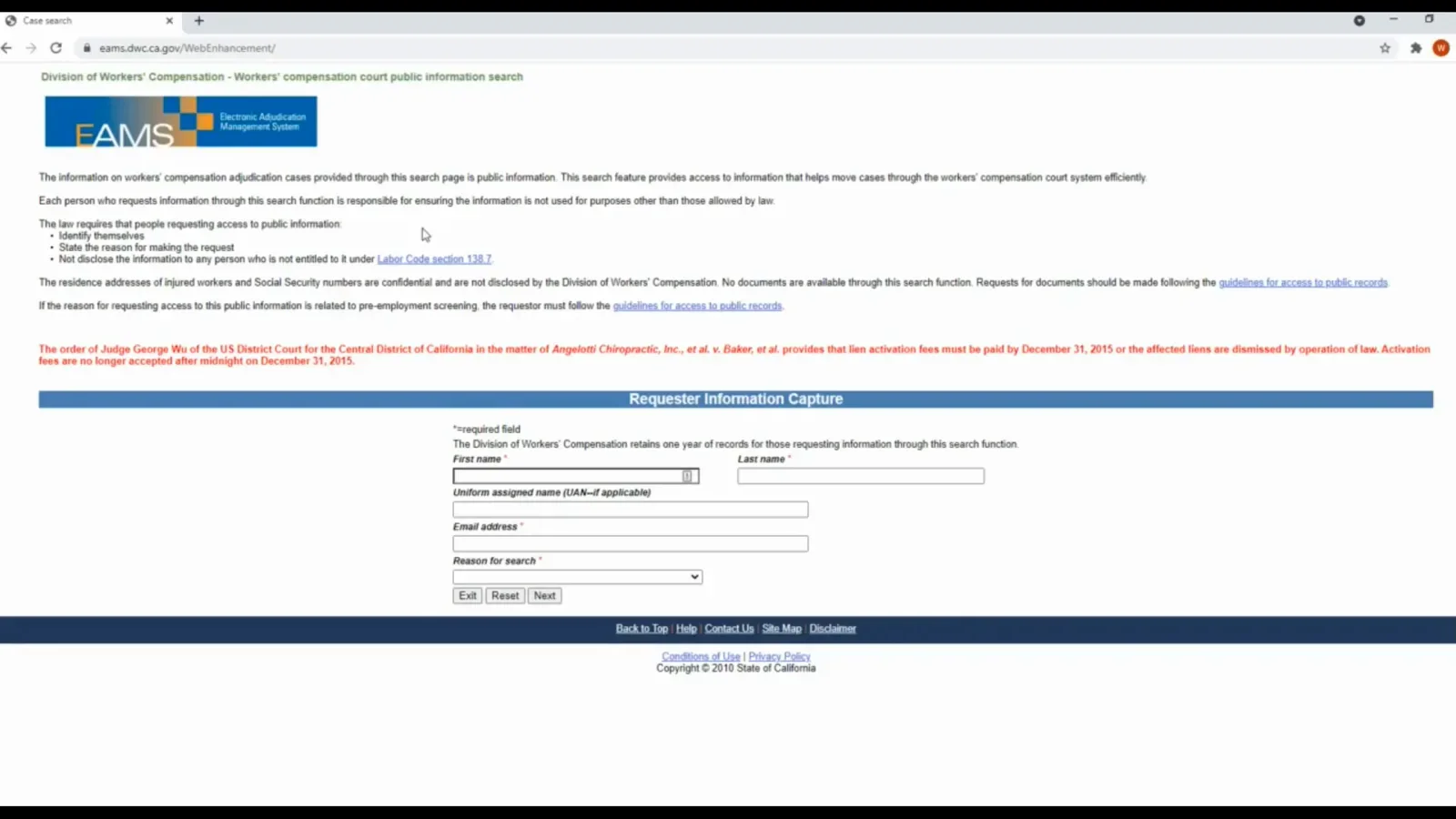
The official starting point — the only search a California injured worker needs.Watch at 1:08 - 2
Identify yourself and pick the reason for the search
First name, last name and email address are required. The Uniform Assigned Name (UAN) field is for attorneys and representatives only, so leave it blank if you are the injured worker. Under Reason for search choose the case information option — the second entry on the list — so the system opens case search rather than a lien search, then click Next. The DWC keeps requestor records for one year.
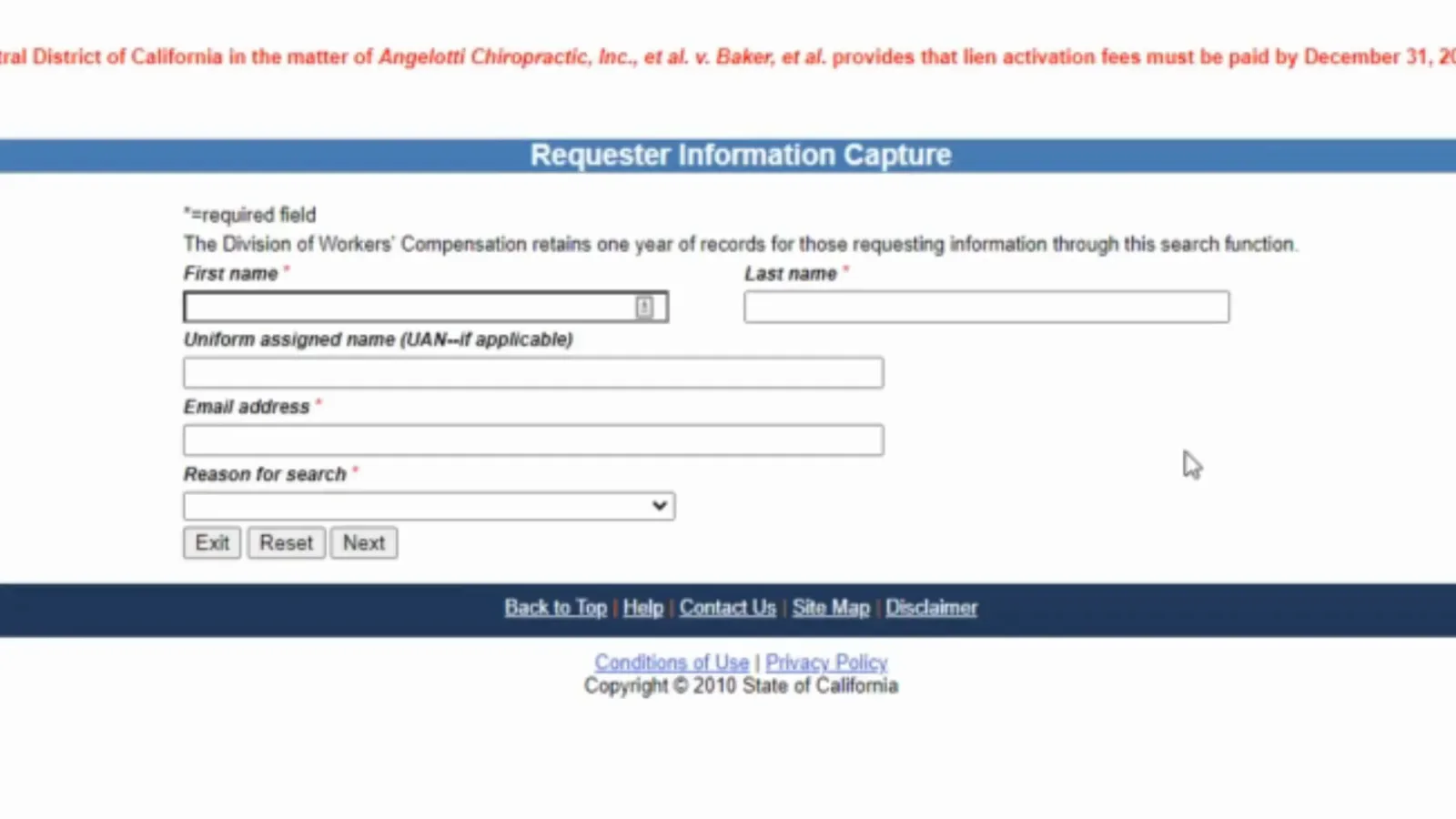
Your own name and email go here, not the injured worker’s.Watch at 1:32 - 3
Search by case number, or by name plus date of birth
A workers comp case number lookup is the shortest route: the minimum criteria is either your EAMS case number (the ADJ number that appears on correspondence from the board) or the injured worker’s first and last name. If your name is common, add the date of birth, the city and/or the ZIP code to cut the list down. This DWC case search covers Adjudication Unit (ADJ) cases only: Disability Evaluation Unit and retraining cases are not in it.
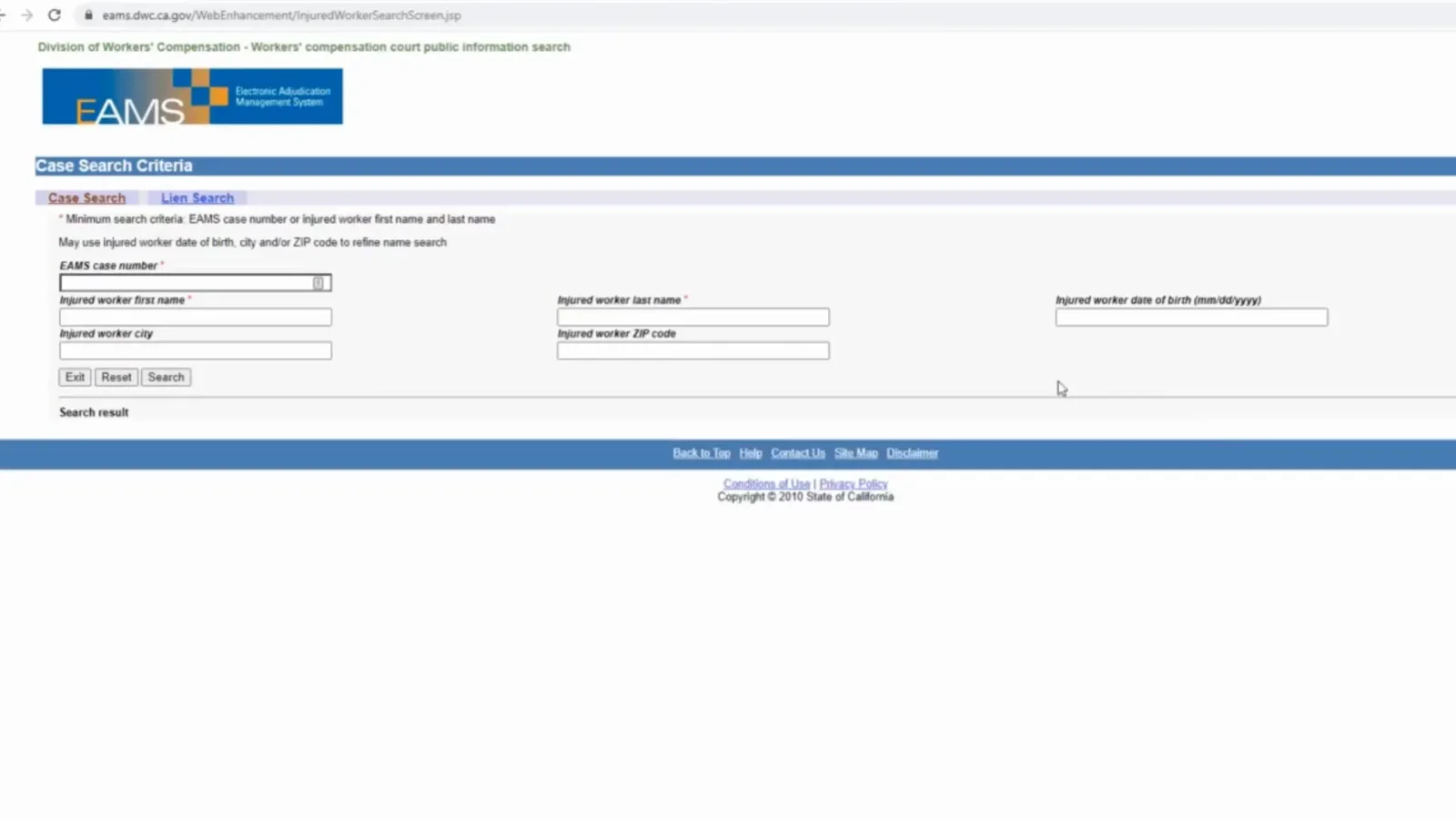
Two ways in: your case number, or your name narrowed by date of birth or ZIP.Watch at 6:34 - 4
Match the right case on the results list
Click View cases next to your name and the list of your claims opens. Read Case location (the venue, for example POM-ADJ for Pomona), Employer and Injury date before you open anything. Someone injured on one specific day and also over a period of time has two separate cases, each with its own case number, so two rows is normal.

Venue, employer and injury date are how you recognize your own cases.Watch at 2:52 - 5
Read the case detail page: body parts and participants
Body Part rows use the DWC codes — 310 arm, 320 wrist, 330 hand, 340 finger(s), 530 foot — so check that every part you injured is on the list; attorneys do sometimes file the wrong part or miss one, and anything missing is worth raising with your attorney. The Participant table lists who is on the case and in what role: the claims administrator, the employer and the law firms.
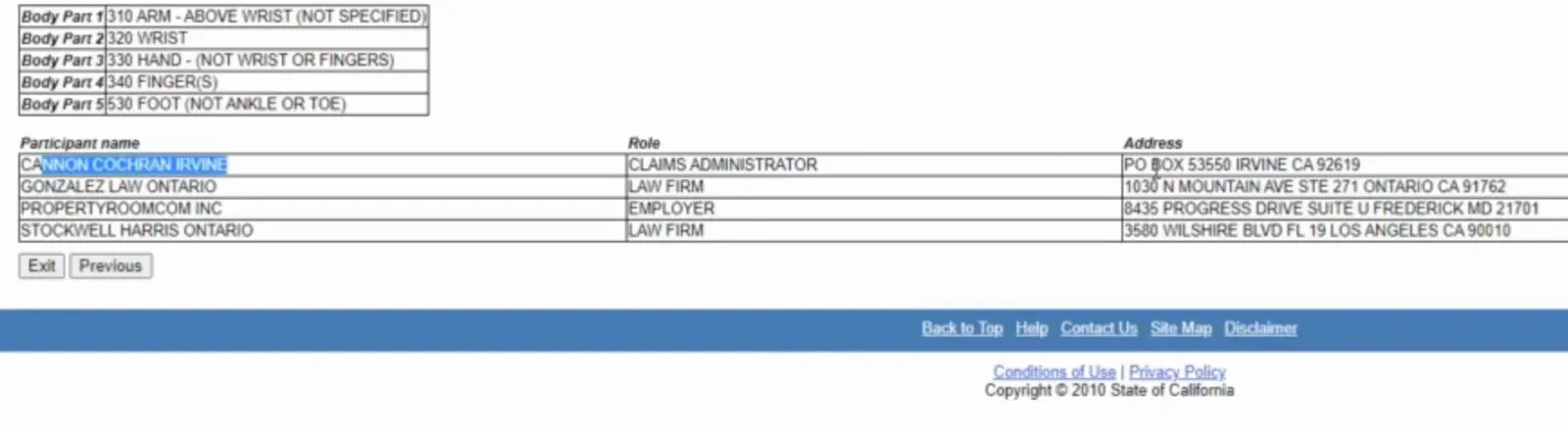
Body-part codes and participants: the two things worth checking every visit.Watch at 4:42 - 6
Open View events to see what has been filed
View events lists the milestones in your case with a general description, a detailed description and an event date. This walkthrough case shows APPLICATION FILED — the day the attorney lodged the paperwork — and ORDER APPROVING C & R, the closing order after a compromise and release. Two useful checks: if the filing date is within a couple of weeks of your first meeting the case went in promptly, and if it is more than a month later it is fair to ask your attorney why.
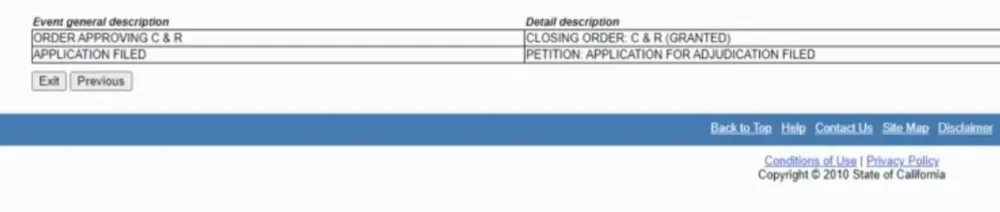
The event list is the plainest answer to “has my case actually been filed?”Watch at 5:22 - 7
Use the event date to time your settlement check
Every row carries an Event date. When the row is the order approving your compromise and release, that date starts the payment clock — the attorney in the source video tells clients the settlement check is due within 30 days of it. If that window has passed with nothing in the mailbox, call your attorney or the claims administrator and read them the date.
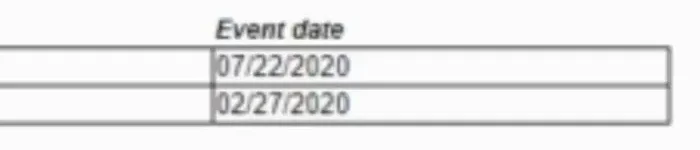
Write the closing order date down before you call anyone.Watch at 5:06 - 8
If your case does not come up
Work through this in order: re-check the spelling of the name and try dropping the middle name; add your date of birth and ZIP code; if you have the ADJ case number, search by that instead. Remember the search only knows what has already been entered — a freshly filed application may not be in the system, and the data is refreshed overnight. If it is still missing after a few days, call the DWC Information & Assistance Unit at 1-800-736-7401, your claims adjuster (their details are on your claim letters), or your attorney.
- 9
What the public search will not tell you
It is not real time: records are refreshed nightly and run about a day behind. It shows no documents, and it withholds Social Security numbers and injured workers’ home addresses. Sessions time out after 15 minutes of inactivity and you re-enter the requestor details to start again. The event list only covers the last six months, except for the filing of the application and closing documents. It is also California only — New York workers use the WCB eCase system at wcb.ny.gov, which only registered parties of interest can open.
Frequently asked questions
- What information do I need before I start a workers comp case lookup?
- Have either your EAMS case number (the ADJ number on any letter from the board) or the injured worker’s first and last name. Keep your date of injury, date of birth and your claim correspondence nearby, because the date of birth and ZIP code are what narrow a common-name search and the employer and injury date are what prove you opened the right case. You are not asked for your Social Security number: the DWC states that SSNs are confidential and are not disclosed through this search. If a carrier or third-party portal asks for the last four digits, that is the insurer’s own identity check, not the state’s.
- My case does not show up — what should I do?
- First check the spelling of the name you typed and try without the middle name, then add the date of birth and ZIP code, then search the ADJ case number directly if you have it. Remember that the system only holds data someone has entered: a newly filed application may not be in it yet and the database refreshes overnight, so give it a day or two around a fresh filing. Also note that only adjudication (ADJ) cases appear here. If it is still missing, call the DWC Information & Assistance Unit at 1-800-736-7401, your claims adjuster, or your attorney with your name, date of injury and employer ready.
- How often is workers comp case status updated?
- The DWC public search is refreshed nightly, so the information is roughly one day behind and it is not a real-time status feed. A filing made today may not appear until tomorrow. The event list also only shows case events from the last six months, with two exceptions: the filing of the application for adjudication and the filing of a closing document are always displayed.
- Can I see documents, the assigned judge, or my hearing date?
- No documents are available through the public search — you request records through the DWC public records process instead. Case information does include the case number, date of injury, case location, assigned judge, archived and DEU indicators, and, if a hearing is already scheduled in the future, the next hearing date, time, type, location and judge. Injured workers’ home addresses and Social Security numbers are confidential and are not disclosed.
- Is there a national workers comp case lookup?
- No — each state board runs its own case system, so there is no single national case search. This walkthrough covers California’s EAMS public information search. New York injured workers use the WCB eCase system at wcb.ny.gov, which is limited to registered parties of interest, and Texas and Florida each run their own claim processes. Our state pages cover what changes from state to state.
Keep reading
Educational information only, not legal advice. Case data comes from the California DWC EAMS public information search and can change without notice; confirm dates, status and payments with your attorney or claims administrator.